Securing the modern multifunction printer in your Miami office, from firmware to user release.
Print security in 2026 means treating every multifunction printer (MFP) as a networked endpoint with the same controls you apply to laptops and servers. The list includes encrypted print jobs, user authentication at the device, secure pull printing, hardened firmware, and continuous monitoring. Barlop Business Systems pairs Ricoh, Sharp, and HP hardware with PaperCut MF and managed IT oversight so your fleet stays locked down without slowing down your team.
Your Printer Is the Quietest Endpoint in the Office & Often the Weakest
Walk through any office and the laptops are patched, the servers are scanned, the firewall is humming. The copier in the corner? It might still have factory default credentials, an outdated firmware build, and a hard drive holding cached scans of last quarter’s payroll. Attackers know this. So do regulators.
And the numbers back it up. According to Quocirca’s 2024 Global Print Security Landscape report, 67% of organizations suffered a print-related data breach in the prior year. Only 26% of IT and cybersecurity professionals feel fully confident their print infrastructure is secure. The gap is the opening criminals are walking through.
So what changed? A few things. The MFP itself grew up. It now runs an embedded operating system, hosts a web admin console, talks to cloud services, and stores documents on an internal drive. Hybrid work scattered users across home offices and coworking spaces. And ransomware crews started scanning for printers because they are easier to compromise than the servers behind them.
What Print Security Actually Looks Like in 2026
When we audit a Miami client’s print environment, we look at four layers. Each one is a place an attacker might pivot. Each one is also a place a careless habit can leak sensitive data without any malice at all.
1. The Device Layer
The printer itself. Is the firmware current? Is the admin password the one stamped on the back of the unit, or has it been rotated and stored in a vault? Does the device have secure boot and signed firmware to block tampering? Are the hard drives encrypted, with overwrite or wipe routines for end-of-lease decommissioning?
2. The Network Layer
How the printer talks to the rest of your office. Is it on a flat network with the finance share, or is it isolated on a print VLAN? Are unused protocols (FTP, Telnet, SNMPv1, raw 9100) shut off? Are print jobs encrypted in transit with IPP over TLS or IPsec? Is the device behind your firewall, or accidentally exposed to the public internet through a misconfigured router?
3. The User Layer
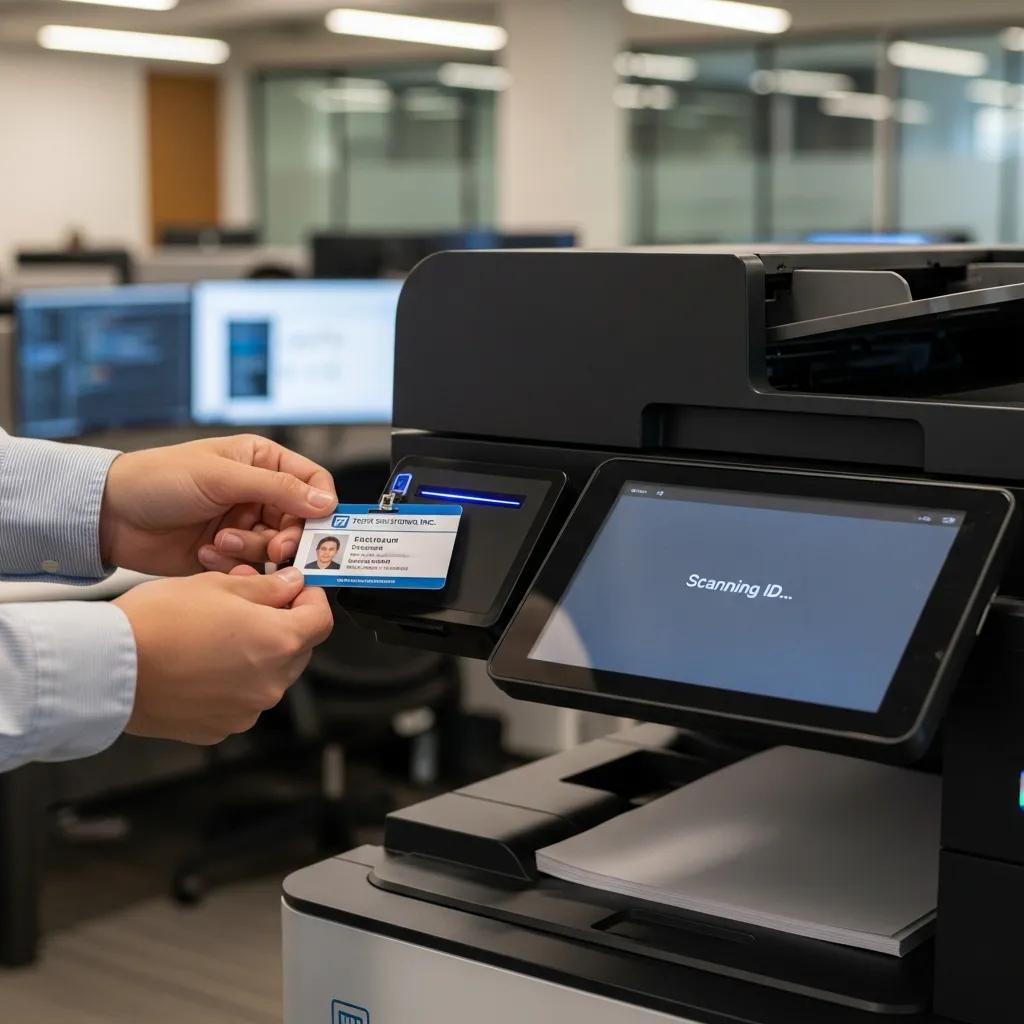
Who can release a print job, and how. Are users authenticating with a badge, PIN, or single sign-on at the panel? Are jobs held in a secure queue until release, so confidential documents do not sit unattended in the output tray? Can a temp employee scan to any email address, or only to a vetted directory?
4. The Document Layer
What happens to the file once printed or scanned. Is there an audit trail of who printed what? Are scanned PDFs encrypted at rest? Is there data loss prevention on outbound scan-to-email? Are watermarks or redactions applied automatically to sensitive content?
You do not need every control on day one. But you do need a plan covering all four. Want to see how your fleet stacks up? EXPLORE MANAGED IT SERVICES
The Six Print Security Risks We See Most in South Florida
Every Miami office has its own quirks. But after 40+ years of Barlop service calls and assessments, the same handful of issues keep surfacing. Here are the ones to watch.
- Default or shared admin credentials. The factory password is often still in place months after install. Or every IT staffer shares one login. Both make incident attribution impossible.
- Outdated firmware. Printers get skipped during patch cycles because they are not on the standard endpoint list. Known CVEs sit open for a year or more.
- Unprotected hard drives. The MFP stores cached jobs, address books, and stored print queues. Without encryption and end-of-life wipe, the data walks out the door with the lease return.
- Open scan-to-email and scan-to-folder. Anyone can scan to anywhere. So they do. Sensitive PDFs land in personal Gmail accounts and unsecured shared drives.
- Unattended output trays. The classic. A confidential HR letter sits in the tray until someone else’s coffee run picks it up by accident.
- Home printers on the corporate network. Hybrid work pushed a lot of printing onto employee-owned home devices. Quocirca found 57% of SMBs name home printers as their top print data loss factor.
The Eight Print Security Controls Worth Implementing First
If you have one quarter to harden your print environment, focus here. These are the controls blocking the most attacks for the least disruption.
| Control | What It Does | Effort |
|---|---|---|
| Change default admin credentials | Stops trivial remote takeover | Low |
| Apply current firmware | Closes known CVEs and exploit paths | Low |
| Enable hard drive encryption | Protects cached jobs at rest | Low |
| Disable unused protocols and ports | Shrinks attack surface | Medium |
| Require user authentication | Binds every action to a person | Medium |
| Turn on secure pull printing | No documents in tray; no leaks | Medium |
| Segment printers on a dedicated VLAN | Blocks lateral movement to file servers | Medium |
| Deploy fleet management with audit logs | Visibility, alerts, forensics | Higher |
None of these are exotic. The hard part is doing them consistently across every device, every branch, every quarter. This is where a managed print partner earns its keep.
What Print Security Costs (Honestly)
You will hear vendors quote a range so wide it borders on useless. So here is a more grounded view, based on Miami-area deals Barlop runs.
| Office Profile | Devices | Typical Monthly MPS Range | Security Layer Adds |
|---|---|---|---|
| Small Miami office | 2 to 5 MFPs | $150 to $500 | Authentication; encryption; basic monitoring |
| Mid-market firm | 6 to 20 MFPs | $600 to $2,200 | PaperCut MF; secure release; VLAN; audit logs |
| Multi-site enterprise | 20+ MFPs | $2,500+ | Zero Trust controls; SIEM integration; DLP |
Note: these are managed print pricing examples and do not include hardware lease cost or break-fix service. The security layer is a small fraction of the total. And it usually pays for itself by reducing waste, consolidating devices, and avoiding one breach response.
Worth comparing against the average breach cost. IBM’s 2024 Cost of a Data Breach report pegs the average US breach at $9.36 million. So even if you spend $25,000 a year on a hardened print program, the math is not close.
How PaperCut MF Anchors Our Print Security Stack
Barlop has been a PaperCut partner for years. We deploy both PaperCutNG and PaperCutMF, paired with Ricoh, Sharp, and HP MFPs. Why this stack? Because PaperCut handles the messy human parts of print security in a way usable on a Tuesday afternoon.
What it does in practice
- Holds every print job in a secure queue until the user authenticates at the device with a badge tap, PIN, or AD credentials.
- Encrypts jobs in flight from the workstation to the printer.
- Logs every print, copy, and scan with user, time, and document name for audit and compliance.
- Applies watermarks or digital signatures to sensitive documents automatically.
- Triggers alerts on suspicious behavior, like a sudden 800-page print job at 11 PM.
- Integrates with Active Directory, Azure AD, and major SSO providers.
PaperCut is built in line with security best practices like the CERT Coding Standards and the OWASP Top 10, and it leans on Active Directory groups to enforce role-based access. Admins can have full system rights; office staff can be limited to running reports or shared account management. The point is granularity. Not every employee needs full admin access on every device. PaperCut makes it easy.
Zero Trust Comes for the Printer Too
Zero Trust gets thrown around so much it starts to sound like a buzzword. But the core idea is simple. Trust nothing by default. Verify every request. Even from devices already inside your network.
Gartner has projected 60% of enterprises will embrace Zero Trust as a starting point for security. So printers fall in scope too. So what does it look like at the MFP?
- The printer authenticates to your network before it joins, using 802.1X or certificate-based auth.
- Every print job is signed and encrypted between the originating user and the device.
- The user authenticates at the panel with multi-factor or single sign-on, not a shared PIN.
- The MFP only talks to a curated list of internal services. Outbound calls to unknown destinations get blocked.
- Behavior is continuously monitored. Anomalies trigger alerts, not silent acceptance.
You do not have to flip the switch on all of this overnight. But it is a useful checklist for the path forward. We help Miami clients map their current state against it, then prioritize the moves with biggest payoff.
For the official frameworks behind this approach, see the NIST Zero Trust Architecture special publication and the CISA Zero Trust Maturity Model. Both translate well to print fleet hardening.
HIPAA, PCI, FERPA: Print Touches All of Them
If you handle health records, payment data, student records, or anything covered by Florida’s information protection law, your printers are in scope. This catches a lot of office managers. But every scanned chart, every credit-card receipt run through the MFP, every transcript copy is regulated content.
What auditors look for:
- Access controls on the device. Who can use it, who can administer it.
- Audit trails. A log of who printed or scanned what, when.
- Encryption. Both in transit and at rest on the device hard drive.
- End-of-life data destruction. A certified wipe before the lease return.
- Documented policies. A written print security policy staff have actually read.
Miami healthcare offices, accounting firms, and law practices all run into this. The good news: a well-run managed print program ticks most of the boxes by default. The Business Technology Association (BTA.org) maintains best-practice resources for compliance-grade fleet management worth reviewing.
How Barlop Business Systems Helps Miami Companies Lock Down Print
Print Fleet Audit
We map every device, firmware version, and configuration gap across your offices. You get a written risk score with prioritized fixes.
Hardware Hardening
Ricoh, Sharp, HP, and Brother MFPs deployed with current firmware, encrypted drives, and disabled legacy protocols out of the box.
PaperCut Deployment
Secure pull printing, badge release, audit logs, and watermarking tied to your Active Directory or Azure AD.
Network Segmentation
Our managed IT team builds a print VLAN, locks down ACLs, and isolates printers from your finance and clinical systems.
Continuous Monitoring
24/7 alerting on firmware drift, failed logins, anomalous print volumes, and unauthorized configuration changes.
Lifecycle & Wipe
End-of-lease wipe certificates so cached scans never leave the building on a returned hard drive.
Every one of these layers is part of our managed IT and managed print bundle. We have served South Florida since 1983. And as a family-owned, woman- and minority-owned business based in Doral, our team understands what local mid-market firms actually need. You can review our full equipment catalog to see the secure-by-default Ricoh, Sharp, HP, and Brother MFPs we deploy.
Questions to Ask Any Print Security Vendor
Before you sign with anyone (us included), ask these questions. The answers tell you a lot.
- Do you publish a written print security assessment with my proposal? Yes or no.
- Which firmware versions ship on the devices you propose? When were they released?
- How do you authenticate at the device? Badge, PIN, or SSO; can it tie into our identity provider?
- Will the print jobs be encrypted in transit? Which protocols?
- What happens to my hard drives at end of lease? Do I get a wipe certificate?
- Who patches firmware, you or my IT team? On what schedule?
- What logs and alerts do I see, and how are they delivered?
- Can I get a list of three local references in healthcare, finance, or legal?
If a vendor stumbles on any of these, you have your answer. We invite buyers to compare us against our written assessment process at our copier and printer lease page for hardware specifics.
Ready for a Print Security Assessment?
Barlop will audit your existing fleet, score your risk, and show you a prioritized fix list. No charge, no pressure.
EXPLORE MANAGED IT SERVICES
Sales: (786) 833-7781
Miami’s Trusted Office Equipment & Managed IT Partner for Over 40 Years
Frequently Asked Questions About Print Security
1. Is my office printer really a security risk?
Yes. A modern multifunction printer is a networked computer with storage, an operating system, and a web admin console. Quocirca’s 2024 report found 67% of organizations had a print-related breach in the prior year. So the data is clear.
2. What is the single biggest print security mistake businesses make?
Leaving the factory default admin password in place. It takes minutes to fix. But many MFPs ship and never get rotated. Attackers scan for these all day.
3. What is secure pull printing, and why does it matter?
Secure pull printing holds your job in a queue until you authenticate at the device with a badge or PIN. So no documents sit unattended in the output tray. It is one of the highest-impact controls you can deploy, and users actually like it.
4. Do I need PaperCut, or can I use what came with my printer?
Most MFPs include some basic authentication features. But PaperCut adds centralized policy, audit logging, and granular role-based access across mixed fleets. If you have more than three or four devices, PaperCut pays for itself quickly.
5. How often should I update my printer firmware?
Treat it like any other endpoint. We recommend a quarterly review at minimum, with critical patches applied within the same change window as your servers. Barlop manages this on autopilot for fleet customers.
6. What about printers in employee home offices?
Those are a real risk. Quocirca found 57% of SMBs name home printers as their top print data loss factor. Best practices include cloud print services with secure release, restricting which document types can print to home, and using virtual desktop infrastructure where compliance demands it.
7. Is print security a HIPAA concern?
It can be. If you scan or print protected health information, your MFP and its hard drive are in scope. You need access controls, audit logs, encryption, and secure end-of-life data destruction. Barlop helps Miami medical practices document all of this.
8. How does Zero Trust apply to my printer?
Zero Trust means no device, user, or job is trusted by default. For printers, expect certificate-based network auth, encrypted job submission, panel-level user authentication, and continuous behavior monitoring. Gartner expects 60% of enterprises to make this their default starting point.
9. What happens to my printer’s hard drive when the lease ends?
Without a managed print agreement, the device often goes back with cached jobs and address books still on the drive. With Barlop, you get a documented wipe and a certificate of destruction before the unit leaves your office.
10. How long does it take to harden a print fleet?
Quick wins like default password rotation and firmware updates can ship in a week. A full PaperCut deployment with VLAN segmentation and audit logging typically runs four to eight weeks for a mid-market firm, depending on device count and identity provider complexity.
11. Will print security slow my employees down?
If implemented well, no. Badge release at the panel adds seconds, not minutes. And users actually appreciate not chasing print jobs across the office or worrying about leaving sensitive documents in the tray. The productivity hit is small. The peace of mind is large.
12. Can Barlop secure printers from other vendors?
Yes. We support mixed fleets including Ricoh, Sharp, HP, Brother, Canon, Konica Minolta, and others. Our PaperCut and managed IT layer sits above the hardware brand. So you do not need to rip and replace to get a hardened environment.
Real-World Print Security Wins from Local Clients
A Doral law firm we serve had 14 mixed-brand MFPs scattered across two floors. Confidential drafts kept showing up in the wrong tray, and audit prep was painful. We rolled out PaperCut MF with badge release, segmented the printers onto their own VLAN, and consolidated to nine devices. Audit logs are now one report away. Print-related incidents dropped to zero in the first six months.
A Coral Gables medical practice came to us after their MSP flagged outdated firmware on every printer. We rebuilt the fleet on current Ricoh devices with encrypted drives, applied secure release, and tied scan-to-email into their HIPAA-compliant document workflow. The HR director sleeps better. So does the compliance officer.
And a Miami logistics company unified printing across three warehouses with cloud print from PaperCut Hive, and our managed IT team handles patches centrally. They went from chasing print issues weekly to almost never thinking about it. Which is the goal.
Next Steps for Miami Businesses
Print security is no longer a niche topic. It is part of your overall cybersecurity posture. And for a lot of Miami offices, it is the cheapest, fastest place to close real risk.
Want a starting point? Pick three things this month. Rotate every printer admin password. Pull current firmware versions and patch the laggards. Turn on secure release for at least one device and try it for a week. You will surprise yourself with how quickly habits change.
And when you are ready for a deeper assessment or a managed program, our team is a short call away. Barlop has been Miami’s trusted office equipment and managed IT partner since 1983. We are family-owned, woman- and minority-owned, and based right here in Doral.