A plain-English playbook on stopping email phishing attacks before they reach your team in South Florida
Serving Miami Since 1983 | 12 min read
Quick answer: Email phishing protection works best in layers. You pair smart filtering tools (a secure email gateway, plus SPF, DKIM, and DMARC) with trained people and tested backups. No single product blocks every threat. So Miami businesses that combine technology, training, and a managed IT partner like Barlop Business Systems stop the most attacks and recover fastest when one slips through.
Why Email Phishing Protection Matters More Than Ever
One bad click. That is all it takes. A staff member opens an email, trusts the logo, types a password, and a stranger now owns your network. Email phishing protection is the set of tools and habits which keep that single click from turning into a six-figure disaster.
Phishing is the fraudulent practice of sending emails which look like they come from trusted companies, all to trick someone into handing over passwords, banking details, or company data. It is old. It is simple. And it still works far too often.
Industry researchers estimate roughly 3.4 billion phishing emails go out every single day (an approximate figure widely cited across security vendors). Most of them fail. But your business only needs one to land in the wrong inbox on the wrong morning. So the goal is not perfection. The goal is layers, speed, and a team which knows what a trap looks like.
Barlop Business Systems has watched this threat grow up. We started in 1983 as an office equipment company, and today we help small and mid-sized South Florida businesses defend the inbox as a core part of our managed IT services in Miami.
of cyberattacks start with a phishing email, according to widely cited industry research
The Five Faces of a Phishing Attack
Phishing is not one thing. It wears different masks depending on who the attacker wants to fool. Knowing the types helps your team spot them faster.
- Bulk phishing. The wide net. Thousands of generic emails pretending to be a bank, a delivery service, or a software login. Cheap to send, easy to spot once you know the signs.
- Spear phishing. Targeted and personal. The attacker researches your company, names your boss, and references a real project. Much harder to catch.
- Business email compromise (BEC). The expensive one. A criminal impersonates an executive or vendor and asks accounting to wire money or change payment details. No malware needed, just a convincing story.
- Clone phishing. A real email you already received, copied almost perfectly, with one link swapped for a malicious one.
- Smishing and vishing. Phishing by text message or phone call. The inbox is still the main door, but attackers knock on every entrance.
BEC deserves special attention. It skips the suspicious attachment entirely and goes straight for your wallet. And because the email often comes from a real, compromised account, your filters may wave it right through.
Red Flags Your Team Can Learn to Catch
Most phishing emails share a handful of tells. Teach these to your staff and the catch rate climbs quickly. None of them is proof on its own, but together they should make anyone pause.
- Urgency and pressure. “Act now or your account closes.” Real companies rarely rush you like this.
- A mismatched sender address. The display name says your bank, but the actual address is a string of random letters at a strange domain.
- Links that hide their real destination. Hover before clicking. If the preview points somewhere odd, stop.
- Requests for money or credentials. Any email asking for a wire transfer, a password, or a gift card deserves a second look and a phone call.
- Slightly-off branding. A logo a little blurry, a footer address gone stale, a greeting like “Dear Valued Customer.”
- An attachment you did not expect. Surprise invoices and zipped files are classic malware carriers.
Here is a simple rule we share with clients across Miami-Dade. When an email creates a strong emotion, fear, urgency, or excitement, slow down. Attackers want you reacting, not thinking. A five-second pause stops more breaches than any single tool.
What One Successful Phish Actually Costs
People assume a phishing loss means a stolen password. Sometimes. But the bill adds up fast once you count downtime, recovery, legal exposure, and lost trust.
The FBI Internet Crime Complaint Center reported $16.6 billion in total cybercrime losses for 2024, a 33% jump over the prior year. Business email compromise alone accounted for roughly $2.77 billion of it, per the FBI IC3 2024 annual report. Phishing and spoofing were the single most reported crime type, with more than 193,000 complaints.
The damage hits small companies hard. Industry estimates suggest small businesses absorb a large share of attacks while running some of the thinnest defenses. The average cost of a data breach reached an estimated $4.88 million in 2024 (a global figure from IBM widely reported in security press). Smaller firms rarely pay that headline number, yet for a 30-person Doral company, even a fraction of it can be the difference between a good year and layoffs.
And the direct theft is only part of the story. Think about the hours your team loses while systems are down. The clients who hesitate after a breach notice lands in their inbox. The compliance penalties if regulated data walked out the door. Cyber insurance helps, but premiums climb and claims get denied when basic protections were missing. So the real cost is rarely just the wire that left the account. It is the trust and time you spend rebuilding afterward.
lost to business email compromise in 2024 alone, per the FBI IC3 report
Layered Email Phishing Protection That Actually Holds
Here is the honest truth. There is no magic box. Any vendor promising 100% protection is selling you a story. Real defense stacks several layers, so a miss on one is caught by the next.
Layer 1: Filter before it lands
A secure email gateway sits between the internet and your inboxes, scanning every message for known scams, bad links, and malware. Modern filters add AI which reads tone and context, not just keywords. They catch the obvious stuff so your people never see it.
Layer 2: Prove the sender is real
Three email authentication standards do the heavy lifting here: SPF, DKIM, and DMARC. Together they confirm a message truly comes from the domain it claims, which shuts down a huge slice of spoofing. Many South Florida businesses have these records half-configured or missing entirely. We fix it first.
Layer 3: Lock the door with MFA
Multi-factor authentication means a stolen password is not enough. The attacker also needs a code from a phone or a hardware key. The federal cybersecurity agency CISA calls MFA one of the most effective steps a small business can take. Read their guidance on teaching employees to avoid phishing.
Layer 4: Back up so ransomware loses its grip
Some phishing emails carry ransomware. If your data is backed up, tested, and stored offsite, a ransom demand becomes a bad afternoon instead of a closed business. We treat tested backups as non-negotiable.
Layer 5: Train the humans
Tools catch most threats. People catch the rest. A trained team is your last and best line, and we will come back to building a human firewall in a moment.
Going It Alone vs Working With a Managed IT Partner
Plenty of owners try to handle email security themselves. It can work for a while. But the gaps tend to show up at the worst possible time. Here is a side-by-side look.
| Capability | DIY / Built-In Email | Managed With Barlop |
|---|---|---|
| Spam and basic filtering | Included, basic | Advanced AI-driven gateway |
| SPF, DKIM, DMARC setup | Often missing or partial | Configured and monitored |
| Multi-factor authentication | Optional, often skipped | Enforced across accounts |
| Phishing simulation and training | Rare | Ongoing and tracked |
| 24/7 threat monitoring | None | Continuous |
| Tested offsite backups | Hit or miss | Scheduled and verified |
| Response when something slips | You, alone, at 2am | A local team which answers |
Notice the pattern. The built-in tools are not useless. They are just incomplete. A managed approach fills the gaps and, more importantly, gives you a phone number to call when the screen flashes red.
How AI Made Phishing Harder to Spot
Remember the old advice? Watch for bad grammar and clumsy English. Well, the tip is fading fast. Generative AI now writes phishing emails in flawless, friendly prose, in any language, at massive scale.
Security teams have reported a sharp rise in AI-written phishing since late 2024, with some estimating these messages now make up a large share of reported attacks. The spelling is clean. And the tone matches your vendor perfectly. A fake invoice looks completely real. So the old visual tells are not enough anymore.
What still works? Verifying through a second channel. Got an urgent wire request by email? Call the person. Got a login alert? Go to the site directly, never through the link. AI can fake a message, but it cannot answer your phone call from the real CFO. Barlop helps clients build these verify-first habits into daily routines.
Building a Human Firewall on Your Team
Your staff is not the weak link. Untrained staff is. Give people the right reflexes and they become sensors, spotting odd emails your filters might miss.
- Run real simulations. Send safe, fake phishing tests, then coach (never shame) anyone who clicks. Scores climb fast.
- Keep it short and frequent. A yearly slideshow does little. Quick monthly nudges stick.
- Make reporting easy. A one-click report button turns every employee into an early warning system.
- Reward the catch. Celebrate the person who flags a sneaky email. Culture beats fear.
- Cover the whole team. Owners and executives are prime BEC targets, so leadership trains too.
The NIST Cybersecurity Framework, a respected federal standard, treats awareness and training as a core pillar of defense. You can review it on the NIST website. Tools and people, working together, beat either one alone.
The First Hour After Someone Clicks
Mistakes happen. Even sharp teams click sometimes. What you do in the next sixty minutes shapes how bad it gets. So have a plan ready before you ever need it.
- Disconnect, do not panic. Pull the affected device off the network so anything malicious cannot spread to shared drives.
- Change the passwords. Reset the compromised account and any account sharing the same password. Turn on MFA if it was not already active.
- Call your IT partner. A managed team can check logs, spot what the attacker touched, and lock things down fast. Speed beats guesswork here.
- Watch the money. If a wire or payment was involved, contact your bank right away. Fast reporting sometimes recovers funds.
- Tell the team. A quick heads-up warns coworkers who may have gotten the same email. Quiet embarrassment helps no one.
- Write it down. Note what happened and when. The record helps recovery, insurance, and prevention later.
This is exactly where a local partner earns its keep. When a Barlop client calls about a suspicious click, they reach people who know their network, not a ticket queue three time zones away. Minutes matter, and a familiar voice who can act right away makes the whole difference.
How Barlop Business Systems Protects Your Inbox
We bundle the layers above into one managed service, run by a local team which knows South Florida. Here is what it looks like day to day.
AI Email Filtering
An advanced gateway screens every message and quarantines threats before your team ever sees them.
Authentication Setup
We configure SPF, DKIM, and DMARC so spoofed senders get blocked at the door.
MFA Everywhere
We roll out multi-factor authentication across email and key apps, the right way, with minimal friction.
Security Awareness Training
Ongoing simulations and short lessons turn your staff into a sharp human firewall.
Backup and Recovery
Tested, offsite backups mean ransomware becomes an inconvenience, not a catastrophe.
Local 24/7 Support
When something looks wrong, you reach a real Miami team fast, not a faraway call queue.
Why Miami and Doral Businesses Are on the Target List
South Florida runs on small and mid-sized businesses. Import and export firms near the airport. Medical offices in Kendall. Real estate and title companies handling big wire transfers every week. Attackers know it.
Title and real estate fraud is a real worry here. A criminal who slips into an email thread can redirect a closing wire in seconds, and the money is often gone before anyone notices. So companies handling client funds carry extra risk, and they need extra layers. We build defenses around how money actually moves through your business, not a generic template.
Language adds another angle. Many local teams work in English and Spanish, and modern AI phishing produces both fluently. So a bilingual workplace cannot rely on spotting awkward translation anymore. Verify-first habits matter for every message, in every language.
Why South Florida Businesses Trust Barlop
We are not a national chain reading from a script. Barlop Business Systems is a family-run, woman-owned and minority-owned company based in Doral, serving Miami-Dade and Broward for over 40 years. We grew up with this community, and many of our clients have been with us for decades.
The history matters for security. Threats change weekly, so you want a partner who answers the phone, knows your setup, and shows up. Whether you run a law office in Brickell, a clinic in Kendall, or a logistics firm near the airport, we tailor the defense to how you actually work.
Curious where you stand right now? A quick look often reveals missing authentication records, skipped MFA, or stale backups. We offer a free network assessment to map the gaps before an attacker finds them. And if you also need print, copier, or document tools, we cover those too through our equipment catalog and copier and printer leasing.
Being woman-owned and minority-owned also helps us partner with organizations and agencies across Miami-Dade that value diverse, certified vendors. But the bigger point is simpler. We answer the phone. We show up. And we treat your business like a neighbor, because for four decades that is exactly what you have been. You can learn more about our full story and services on the Barlop website.
What Email Phishing Protection Typically Includes
Pricing depends on headcount and what you already run. But the building blocks are consistent. Here is a rough tier guide so you know what to expect.
| Tier | Best For | What It Covers |
|---|---|---|
| Essentials | Very small teams | Email gateway, SPF/DKIM/DMARC, MFA setup |
| Protected | Growing SMBs | Everything in Essentials, plus training, simulations, and backups |
| Managed Complete | Compliance-minded firms | Full stack, plus 24/7 monitoring and incident response |
Most South Florida small businesses land in the middle tier. It balances strong protection with a budget a 10 to 50 person company can plan around. We will price it against your real risk, not a generic checklist.
One more thing worth saying plainly. Email security is not a one-time purchase. Attackers change tactics constantly, so the tools and training need regular tuning. A managed plan keeps your defenses current without you having to track every new scam yourself. And that steady upkeep, month after month, is what actually keeps the inbox safe over the long haul.
Email Phishing Protection FAQ
What is email phishing protection?
It is the combination of tools and habits used to stop fraudulent emails from tricking your team. It includes filtering software, sender authentication, multi-factor login, backups, and staff training, all working as layers.
Can a spam filter alone stop phishing?
No. A good filter catches most bulk scams, but targeted attacks and business email compromise often slip through. So filters need backup from authentication, MFA, and trained people.
What are SPF, DKIM, and DMARC?
They are three email authentication standards. They confirm a message really comes from the domain it claims, which blocks a large share of spoofed and forged emails. Many businesses have them set up incorrectly, so attackers exploit the gap.
Is multi-factor authentication really necessary?
Yes. MFA stops a stolen password from becoming a full account takeover. Federal agencies rank it among the highest-impact, lowest-cost steps a small business can take.
How does business email compromise work?
A criminal impersonates an executive or vendor and asks someone in accounting to wire money or change banking details. There is often no malware, just a convincing message. Verifying requests through a second channel is the best defense.
Has AI made phishing worse?
It has. AI writes clean, persuasive scam emails at scale, so the old advice about spotting bad grammar no longer holds. Verify-first habits and layered tools matter more than ever now.
How often should staff get security training?
Short, frequent sessions beat one long yearly class. Monthly simulations and quick refreshers keep awareness high, since threats shift constantly.
What do we do right after a suspicious email?
Do not click anything. Report it with your one-click button or to IT, then delete it. If someone already clicked, change passwords and call your IT partner right away so they can contain it.
Do small Miami businesses really get targeted?
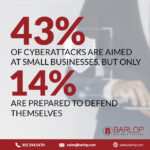
Yes, and often. Smaller firms tend to run lighter defenses, which makes them attractive. Industry estimates put a large share of attacks on small businesses every year.
How much does managed email protection cost?
It scales with your team size and needs. Most small South Florida businesses find it costs far less than a single successful breach. Barlop prices it against your actual risk after a quick assessment.
Why choose Barlop Business Systems for email security?
We are a local, family-run, woman-owned and minority-owned company serving Miami for over 40 years. You get layered protection plus a real team which answers the phone when minutes count.
Stop Phishing Before It Reaches Your Team
Let Barlop Business Systems audit your inbox defenses and build layered protection around your South Florida business. Miami’s Trusted Office Equipment & Managed IT Partner for Over 40 Years.
EXPLORE MANAGED IT SERVICES
Call (786) 833-7781