Sharp Printer Repair & Maintenance in Doral: Expert Solutions to Keep Your Business Running
Local businesses in Doral depend on Sharp printers and multifunction copiers to keep work moving. When those devices fail, delays ripple through teams and slow productivity. This page explains how professional Sharp printer repair and planned maintenance reduce downtime, protect print quality, and fit into broader managed IT and cybersecurity practices tailored for Doral companies. Read on to learn which Sharp series we commonly service, how preventative maintenance extends device life, what same‑day emergency options exist, and how managed print services cut costs and improve security. We also cover common error codes, parts and consumables guidance, and practical troubleshooting steps any IT manager or office administrator can use right away.
Why Barlop Office Systems Is the Go‑To Partner for Sharp Printer Service in Doral
Barlop Office Systems acts as a local, full‑service partner for businesses that need dependable Sharp copier and printer support in Doral. Our focus is simple: combine on‑site repair, copier leasing, managed IT and cybersecurity so your print infrastructure stays secure and operational. For organizations that prefer a single vendor to handle equipment, parts and network integration, working with a provider that covers both office hardware and IT creates clearer accountability when printers interact with authentication systems and the corporate network.
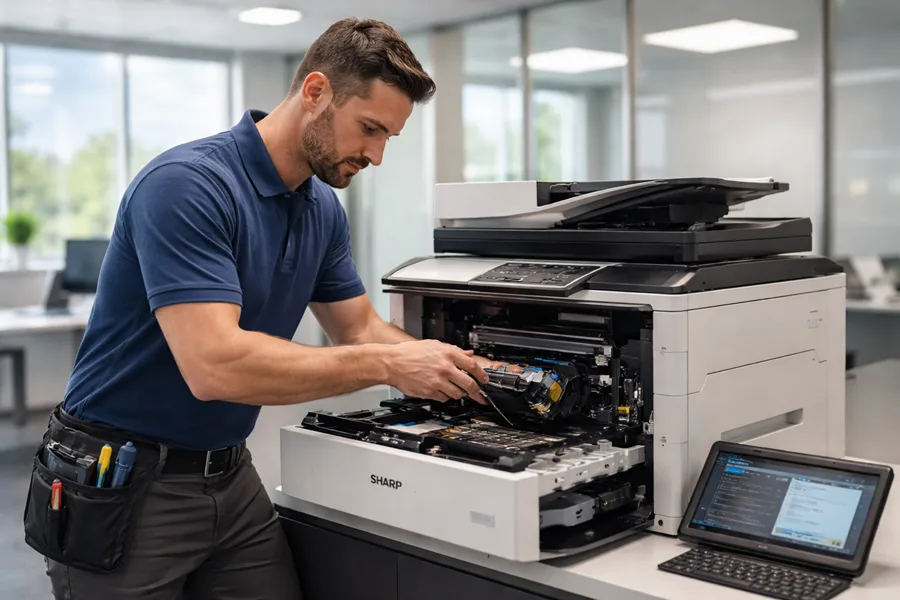
We set ourselves apart with certified technicians, local parts stocking, and service level agreements tailored to reduce disruptions. Our service process is predictable and practical: technicians diagnose the fault, repair or replace worn components like fusers or controller boards, then verify the device is fully operational. The result is consistent uptime and more predictable service costs that support business continuity in Doral.
How Our Certified Technicians Deliver Dependable Sharp Copier Service
Our certified technicians use a repeatable diagnostic workflow: identify the symptom or error code, isolate the failing subsystem (for example, fuser, drum, or paper feed), and apply the right fix or part replacement. We use diagnostic tools and logs to track intermittent faults and confirm firmware or controller issues—reducing return visits and speeding repairs. After any repair, we run verification tests for printing, scanning and network functions so the MFP meets performance expectations. This diagnose → repair → test rhythm produces reliable outcomes and lowers the chance of repeat failures.
During service visits technicians also perform preventative checks—cleaning paper paths, confirming firmware versions and inspecting consumables. They document findings and next steps so on‑site IT staff have clear handoffs for fleet maintenance. Those proactive checks substantially reduce the probability of future failures.
Advantages of Local Sharp Printer Support in Doral
Local support matters because proximity shortens travel time, improves parts availability, and gives technicians practical knowledge of common local network setups. Keeping parts like toner cartridges and fuser units in a nearby inventory lets us complete repairs faster and avoid days‑long waits for shipments from distant warehouses. Faster response means fewer manual workarounds and less reliance on external print services.
Over time our technicians learn the recurring issues that affect different business types—high‑volume print environments, specialized workflows, or reception areas—and can recommend tailored maintenance schedules and parts stocking. In short: local presence plus stocked inventory → faster response → sustained productivity. For businesses that prioritize uptime, frequent preventative visits and same‑day on‑site support are tangible operational advantages.
Which Sharp Printer and Copier Models We Service in Doral
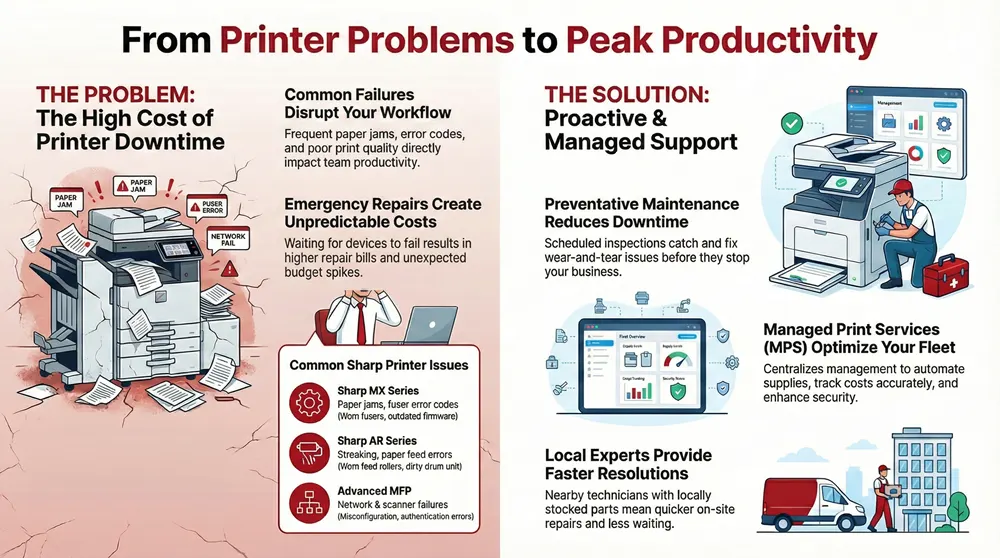
We commonly service Sharp MX and AR series devices across small, medium and large offices. Our work covers the whole device: paper feed and mechanical systems, fuser and drum units, controller boards, network interfaces and scanner assemblies. Knowing which models we support and the typical failure modes helps IT managers decide whether to repair, replace, or enroll a device in a maintenance plan to extend its useful life.
The table below summarizes representative Sharp models and the faults our technicians most often encounter. Use it to speed remote triage and to give accurate model information when you request service.
This quick reference links device class to likely symptoms and immediate interventions so remote triage is faster and on‑site visits are more effective. If your model isn’t listed, check the model label or system information screen and provide that identifier when requesting diagnostics.
Common Issues on Sharp MX and AR Series Printers
MX and AR models usually show wear in moving parts and consumables: repeated paper jams often come from worn feed rollers or misaligned paper paths, while streaks or ghosting point to drum wear or toner build‑up. Error codes (for example: ) commonly indicate fuser or heater faults. Network errors often stem from firmware mismatches or authentication problems with print servers. Quick triage steps—power‑cycling, clearing paper paths, and reseating consumables—can resolve many transient problems.
Preventive actions such as cleaning pickup rollers, replacing worn feed parts, and keeping firmware current reduce the frequency of these failures. When basic triage doesn’t clear the fault, remote diagnostics that pull logs and device status help determine whether the issue is hardware or configuration related and whether an on‑site parts replacement is needed.
How We Fix Problems in Sharp Multifunction Printers
Fixing MFP problems requires checking imaging, scanning and networking subsystems together. Technicians start with scanner alignment and feeder calibration for copy/scan issues, then confirm driver and firmware versions for connectivity or authentication problems. For print‑quality issues we inspect the drum, toner path and transfer rollers and run calibration routines. For network authentication or secure‑print failures we validate network configuration, check certificates where applicable, and ensure firmware complies with current security policies.
If diagnostics show mechanical wear—like a failing controller board or a degraded fuser—or if repeated resets don’t clear an error, we escalate to parts replacement. Every step is documented so IT teams can track component lifecycles and schedule proactive replacements before failures become critical.
How Preventative Maintenance Plans Lengthen the Life of Sharp Printers in Doral
A preventative maintenance plan schedules cleaning, inspection, firmware updates and consumable management to reduce unplanned downtime and extend device life. Regular service interrupts the progression of wear: technicians spot early degradation in components like paper feed assemblies or fuser units and replace them before they trigger major jams. This proactive approach preserves print quality, stabilizes monthly printing costs, and increases the mean time between failures across your fleet.

Maintenance plans are defined by frequency and scope and should match device workload and business priorities. Below are the core benefits presented clearly for quick decision making.
Preventative maintenance delivers clear business value:
- Reduced downtime: Scheduled inspections catch problems before they stop operations.
- Lower repair costs: Replacing parts early is less costly than emergency fixes.
- Improved print quality: Regular cleaning and calibration keep output consistent.
- Predictable budgeting: Bundled maintenance smooths operating expenses and avoids surprise capital spend.
These benefits create measurable ROI. By replacing costly emergency repairs with routine service, organizations usually see fewer interruptions and steadier monthly costs—making capacity planning more reliable.
These tiers align service frequency with device risk. High‑volume or customer‑facing devices often justify more frequent visits; low‑volume, back‑office units may be fine on a quarterly schedule.
What a Comprehensive Sharp Printer Maintenance Contract Covers
A full contract typically includes scheduled on‑site inspections, consumable monitoring, firmware update management and defined SLAs for response times. The agreement should list actions performed at each visit—cleaning paper paths, testing image quality and verifying network settings—and specify which consumables or parts are included versus billed separately. Clear escalation procedures and reporting deliverables give IT managers the documentation they need to track device health and budget for planned replacements.
Contracts that integrate meter tracking with automatic consumable replenishment reduce administrative overhead by ordering supplies based on actual usage. That integration links meter reporting to replenishment, preventing stockouts and minimizing emergency calls caused by depleted toners or worn parts.
How Regular Maintenance Lowers Downtime and Repair Costs
Regular maintenance reduces downtime by catching wear and software issues before they evolve into full failures. Technicians replace degraded components—like feed rollers or fusers—before they cause recurring jams, and firmware updates close vulnerabilities that can trigger network or authentication errors. The net result is fewer emergency calls and less frequent costly component repairs.
For example, proactively replacing a worn feed roller can prevent multiple jam‑related service calls and maintain throughput during peak periods. Across a fleet, the reduction in emergency visits and lost productivity typically outweighs the cost of a maintenance plan while improving operational predictability.
Emergency and Same‑Day Sharp Printer Repair Options in Doral
Emergency and same‑day repair services focus on critical failures—complete device outages, production‑stopping jams or security‑impacting network issues—so your business can resume normal operations quickly. Service tiers usually include remote triage to narrow probable causes, on‑site parts replacement when required, and priority scheduling for mission‑critical devices. Rapid response depends on technician availability, local parts inventory and fault complexity; remote diagnostics often reduce on‑site time by pre‑identifying needed parts.
The table below shows typical response levels and coverage you can expect for urgent service requests.
This framework helps classify incidents and choose the right request channel. Starting with remote diagnostics helps determine whether an on‑site visit is necessary, which saves time and cost.
How Fast Can Barlop Respond to Urgent Printer Repairs?
Response times depend on technician schedules, parts availability and when you log the request. Same‑day service is available for mission‑critical devices when parts are locally stocked. We typically deploy remote diagnostics immediately to triage the fault, collect logs and provide temporary workarounds so printing can continue while parts are staged. When parts are on hand, our technicians complete replacements during the first visit and validate device function before leaving.
Because we maintain local inventory and work frequently on Sharp series devices, service delivery in Doral benefits from shorter lead times. We recommend classifying devices by criticality so the correct SLA applies and on‑site resources can be prioritized during peak demand.
Most Common Sharp Printer Emergencies in Doral Offices
Common emergencies that interrupt workflows include complete device failure, persistent unrecoverable jams, network authentication errors that block printing organization‑wide, and major error codes indicating hardware faults. Immediate mitigations include switching to backup devices, using temporary print queues or hold‑and‑release workflows, and performing safe power cycles to clear transient errors. If those steps don’t restore service, escalate to priority on‑site repair.
For network incidents with security implications, our technicians coordinate with managed IT and cybersecurity teams to minimize risk while restoring print availability. Short‑term workarounds keep operations moving while we implement a lasting fix.
How Managed Print Services Optimize Sharp Fleets for Doral Businesses
Managed Print Services (MPS) improve fleet performance by centralizing device management, tracking meters for accurate cost allocation, automating consumable fulfillment, and scheduling maintenance to lower total cost of ownership. MPS treats printers as part of the IT ecosystem: meter data and device logs feed procurement and maintenance workflows, and firmware and security posture are managed to maintain compliance. The result is fewer break‑fix incidents, predictable printing costs and a print environment that supports business continuity.
MPS also enables smarter device placement and consolidation to eliminate redundant units, reducing per‑page costs and administrative overhead. By combining device analytics with proactive maintenance, MPS minimizes surprise capital expenses and helps IT prioritize investments that deliver the most value.
- Consolidation: Reduce redundant printers to lower costs.
- Meter tracking: Allocate printing costs accurately across departments.
- Consumable management: Automate replenishment to avoid downtime.
Together these MPS elements translate into measurable efficiencies and clearer budgeting for IT and facilities teams.
Cost Savings and Efficiency Gains from MPS
MPS lowers print spending by consolidating devices, tracking actual usage with meter reads, and centralizing consumable procurement. Administrative time spent on supply orders and repair coordination drops because the MPS provider handles those tasks—freeing internal IT to focus on strategic work. Additional gains come from optimized device placement and configuration, for example reducing high‑cost color devices where they aren’t needed and using multifunction units where appropriate.
Typical outcomes include lower cost‑per‑page through toner management, fewer emergency service calls because of planned maintenance, and less time spent handling supplies. Those efficiencies compound across the fleet and produce predictable monthly expenses.
How Cybersecurity Fits into Managed Print Services for Sharp Devices
Printer security in an MPS program focuses on firmware management, secure print release, user authentication and network segmentation. MPS and managed cybersecurity teams coordinate to ensure timely firmware patches and hardened configurations that reduce exposure to known vulnerabilities. Secure print release and authentication prevent unauthorized access to sensitive documents, while logging and monitoring provide audit trails for compliance.
In short: managed cybersecurity enforces printer security controls, reducing data‑leak risk and aligning print operations with your organization’s broader security policy.
Where Doral Businesses Can Get Sharp Parts, Supplies and Troubleshooting Help
Having parts and supplies nearby shortens repair windows and keeps devices running during busy periods. Commonly stocked items include toner cartridges, fuser and drum units, feed rollers and other paper‑path components. Support blends remote diagnostics, online knowledge resources and scheduled on‑site service so you have options for troubleshooting. For many error codes, basic steps—power‑cycling, clearing jams and reseating consumables—restore function and avoid a technician dispatch.
Below is a short list of stocked parts and how local availability improves outcomes.
- Toner cartridges for common Sharp models and series.
- Fuser units and drum units for high‑wear replacements.
- Feed rollers and paper‑path components to resolve jams quickly.
Local stock shortens repair times and reduces the need for interim workarounds, helping offices keep workflows running smoothly.
Frequent Sharp Printer Error Codes and Quick Solutions
Sharp error codes typically indicate mechanical faults (jams, heater failures) or firmware/communication issues. For quick triage, map the error to likely causes and immediate actions:
If an error persists after these steps, remote diagnostics can retrieve detailed logs to determine whether on‑site repair or part replacement is needed. Routing print jobs to another device is a useful temporary workaround while a fix is scheduled.
How Barlop Keeps Genuine Sharp Parts and Supplies on Hand
Barlop Office Systems stocks genuine Sharp parts locally to shorten wait times for repairs. Using OEM parts ensures compatibility with the device controller and imaging systems and can preserve warranty coverage where applicable. Keeping critical components—toner, fuser units and feed assemblies—in local inventory lets us offer same‑day or priority repairs when available.
If you need a parts quote, want to schedule maintenance or require emergency service, contact Barlop Office Systems through our service channels for an assessment and a tailored recommendation. Our combination of office equipment services with managed IT and cybersecurity means your printers stay secure and aligned with company policies.
Frequently Asked Questions
What should I do if my Sharp printer displays an error code?
Start by checking the user manual or the manufacturer’s online resources for that specific code. Common first steps are power‑cycling the unit, checking connections and ensuring consumables are seated correctly. If the error continues, run a remote diagnostic or contact a certified technician—document the error code and any symptoms to speed up the repair.
How can I make sure my Sharp printer is protected from cyber threats?
Keep firmware up to date to patch vulnerabilities, enable secure print features that require user authentication, and segment printers from sensitive networks. Use strong device passwords and consider managed cybersecurity services to monitor and manage printer security settings so they align with your overall IT policy.
What are the signs my Sharp printer needs maintenance?
Watch for frequent paper jams, declining print quality, unusual noises, recurring error codes, slower performance, or spikes in toner use. These are signs the device needs attention. Regular maintenance helps prevent these issues and extends the printer’s service life.
How do I choose the right maintenance plan for my Sharp printer?
Choose a plan based on how often you print, monthly volume and how critical the device is to daily operations. Compare tiers—basic, standard and premium—by their visit frequency, included services and response times. If you’re unsure, consult with a service provider to tailor a plan that fits your budget and operational needs.
Can I do basic troubleshooting on my Sharp printer?
Yes. Clearing jams, checking toner levels, confirming connections and power‑cycling often solve common issues. Resetting to factory defaults can help with persistent problems, but for complex faults it’s best to contact a certified technician.
What is the typical response time for emergency printer repairs?
Response times vary by provider and urgency. Many offer same‑day service for critical failures and next‑business‑day for less urgent issues. Technician availability, local parts inventory and the nature of the fault all affect timing—confirm expected SLAs when you request emergency service.
How can Managed Print Services (MPS) help my business?
MPS optimizes printer usage, reduces costs and improves uptime by centralizing device management, automating supply replenishment and providing regular maintenance. By analyzing usage data, MPS identifies savings opportunities and streamlines operations so your IT team can focus on higher‑value projects instead of day‑to‑day print management.