Elevate: Fully Integrated Unified Communications for Your Business

Elevate is a cloud-based unified communicationsand collaboration platform that provides you with work-from-home and remote work solutions. It enables users to be more mobile, more productive and share ideas and content through a single system. Whether in the office or remotely, Elevate seamlessly integrates all of your communication tools – business phones, mobiles and computers, into a manageable solution geared to your employees’ needs and work styles.

Timer icon representing time management and productivity.

Highly reliable

The Elevate voice network is designed for reliability.

  • East and West Coast data centers provide redundancy and minimize latency.
  • Strict pre-qualification guidelines and proprietary VoIP network testing help ensure a reliable connection and crystal-clear voice quality.
  • Icon representing growth and upward trend, symbolizing Barlop Business Systems' Elevate Unified Communications platform for enhanced productivity and communication.

    Elevate scales according to the needs of any business

    Elevate adapts to any business need

  • Order service according to the number of users or resources needed today; pay only for what is used.
  • Ordering additional services is easy, and you can get up and running quickly.
  • Scalable to numerous users per company
  • Person walking on upward trend graph with lightbulb head and gear symbolizing productivity and innovation in unified communications.

    Increased productivity & collaboration

    Elevate makes the workforce more productive.

  • Allows mobile devices to interact seamlessly with the corporate phone system
  • Anywhere, anytime, on any device, creating a more flexible workforce
  • Transcribes voice messages to text and/or email, enabling more efficient voicemail management.
  • Integrated chat, SMS, video conferencing, screen sharing, file sharing and backup extend reach and facilitate greater collaboration.
  • Timer icon representing time management and productivity.

    Business continuity

    Ensure you never miss an important business call.

  • Elevate mobile app has full business phones functionality to be used in the event desk phones are unavailable
  • Cloud-based systems are immune to local outages. Elevate will test all the user's devices and then dial phone numbers such as cell phones, hunt groups or other auto attendants.
  • Icon representing growth and upward trend, symbolizing Barlop Business Systems' Elevate Unified Communications platform for enhanced productivity and communication.

    Lower cost

    No hardware to buy, install, manage, upgrade or replace.
  • Lower infrastructure and operational costs compared to traditional telephone service
  • Reduces infrastructure and operating costs; no additional hardware to purchase
  • Consolidates voice and data on a single network
  • Flat per-user rates with unlimited national, local and long distance calls.
  • DESKTOP PHONES FOR UNIFIED COMMUNICATIONS

    • Easy-to-use interfaces, great audio quality and productivity features.
    • The phones are pre-programmed to work seamlessly with Elevate, the unified communicationsplatform that provides you with remote work solutions. 
    • The phones are plug and play and can be used anywhere with an Internet connection.
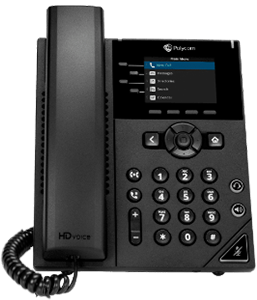
    Polycom HD voice desk phone with touchscreen display and keypad, illustrating unified communication solutions offered by Barlop Business Systems for enhanced business collaboration.

    Polycom VVX

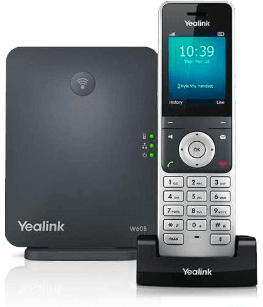
    Yealink W60B cordless phone and base station, showcasing features for unified communications in Barlop Business Systems' Elevate platform.

    Yealink DECT Cordless

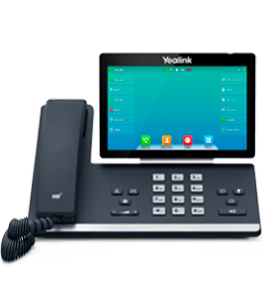
    Yealink VoIP phone with touchscreen display and keypad, showcasing features for unified communications and business collaboration.

    Yealink T57W

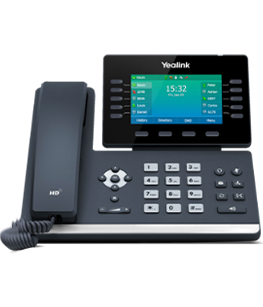
    Yealink HD desk phone with touchscreen display, featuring call history and contact options, representing Barlop Business Systems' Elevate Unified Communications platform for enhanced business communication.

    Yealink T54W

    ELEVATE UNIFIED COMMUNICATIONS – WHAT’S INCLUDED

    Each user receives:

    • Local phone number with single extension
    • Ability to have up to five endpoints
    • Inbound/outbound caller ID
    • WebFax
    • Voicemail with transcription services
    • Elevate Mobile App & Desktop App 
    • Online meeting with up to 4 participants (30 with Elevate Pro)
    • File sharing and backup ShareSync of 2 GB per user (100 Gb per user with Elevate Pro) 

    Each account receives:

    • Local phone number with single extension
    • Ability to have up to five endpoints
    • Inbound/outbound caller ID 
    • WebFax
    • Voicemail box with transcription services
    • Elevate Mobile App & Desktop App Online meeting with up to 4 participants (30 with Elevate Pro) 
    • ShareSync file sharing and backup of 2 GB per user (100 Gb per user with Elevate Pro)

    ELEVATE UNIFIED COMMUNICATIONS – INCLUDED FEATURES

    System Features

    • Voicemail with Transcription
    • Auto Attendant
    • Caller ID
    • Custom Hold Music & Greetings
    • Direct Inbound Dialing (DID)
    • Call Flip
    • Conference Bridge
    • Hunt Groups
    • Hunt Group Call Reporting
    • Email and SMS notifications

    Phone Features

    • Call Forward
    • Call Hold
    • Call Recording
    • Call History
    • Call Transfer
    • Call Waiting
    • 3-way Calling
    • Do Not Disturb
    • Extension Dialling
    • Configurable Ring Options
    • Administrator Password
    • Named Ring Groups
    • Page all Phones
    • Call Park
    • Inbound Caller Name
    • Call Flip
    • Configurable Line Keys
    • Speakerphone
    • On-Hook Dialling
    • Remote Line Key

    ELEVATE PRODUCTIVITY FEATURES | UNIFIED COMMUNICATIONS

    Elevate Desktop Application

    The Elevate Desktop application brings together essential collaboration tools, so employees can send and receive chats and SMS messages, make and receive calls, share screens, initiate video calls and share files, all from a single application.

    • Have the flexibility to use your desktop application to make and receive calls in two ways: as a call controller for your partner business phones,or as a softphone from your Mac® or PC. 
    • One place to view co-workers’ availability, make a phone call, initiate a team chat, send text messages and initiate a video conference.
    • With Elevate desktop and mobile apps, you can take your contacts, files and conversations with you, wherever you are.
    Computer monitor displaying the Elevate Unified Communications platform interface, showcasing chat functionality for business communication and collaboration.

    Elevate Mobile App

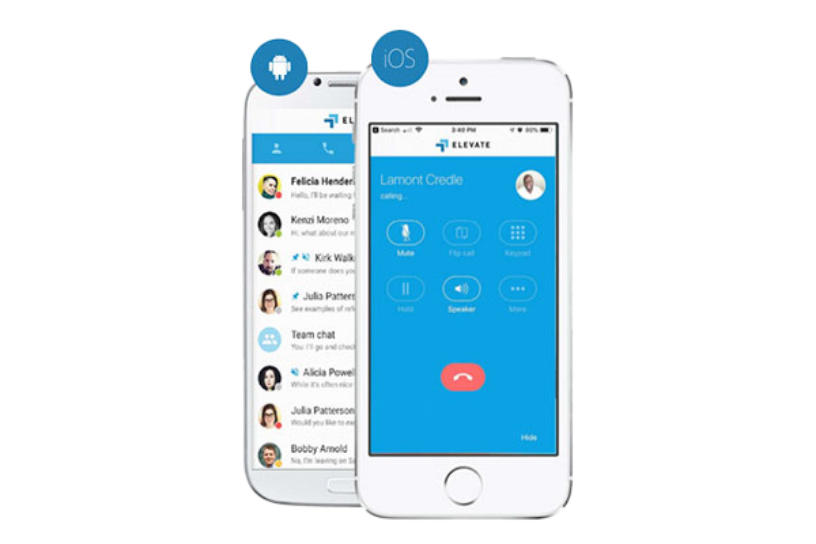
    This powerful app transforms your phone into an essential collaboration tool, making on-the-go teamwork easier than ever. See who’s available, send and receive chats and text messages, make calls and view voicemails, all from a single app, anytime, anywhere.


    • Extend your business phone number and extension to your cell phone, so you can make and receive calls on the go or even transfer calls from your desktop phone to your mobile device, seamlessly and without interruption.
    • All chat and SMS history from your desktop is synchronized with your mobile device, so you can stay connected and continue conversations wherever you are.
    • From your mobile device (Android®, IOS®) sync your contacts from popular third-party platforms (Office365®, G-Suite™ and more) with all your Elevate Apps.


    Barlop Business Systemsin Florida offers you the best remote work solutions with Elevate, the unified communicationsplatform that integrates all your communication needs.

    Smartphones displaying the Elevate Unified Communications app interface, featuring call options and contact list, highlighting productivity and collaboration features for businesses.

    Video Conferencing & Screen Sharing

    Elevate includes Online Meeting, an easy-to-use and reliable video collaboration tool.

    • HD video conferencing eliminates unnecessary travel and enables teams with remote members to be more productive.
    • The computer desktop can be shared with team members in real time, improving collaboration and speedy decision making.
    • Includes a conference dial-in number and customized URLs for meetings On-screen annotations to encourage meeting attendee participation.


    BarlopBusiness Systemsin Florida offers you the best business systemsand business phonesto take full advantage of Elevate, the unified communicationsplatform that connects you to the world.

    Video conferencing interface showcasing multiple participants and a shared document, illustrating features of Barlop's Elevate Unified Communications platform for enhanced business collaboration.

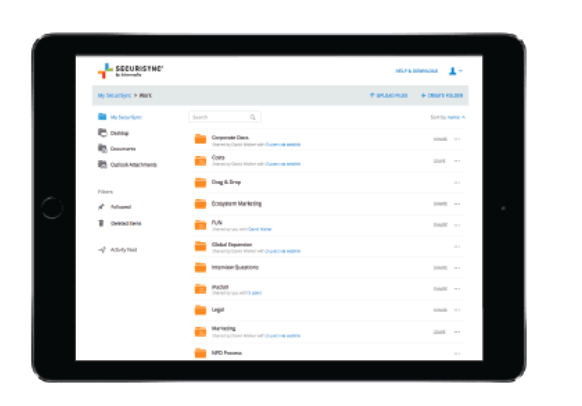
    File Sharing & Security

    File synchronization and file sharing with backup for desktops, mobile devices and file servers.

    • The most current version of your files from any device.
    • Easy and secure file sharing.
    • Integration with Windows File Server, Exchange Email, Active Directory, Outlook.
    • Office and Office 365® – Full control over files, users, devices and sharing activities.
    Tablet displaying the SecuRISTM interface with organized folders for business documents and marketing materials, illustrating the Elevate Unified Communications platform's document management features.

    ELEVATE EXTEND | UNIFIED COMMUNICATIONS

    Elevate Extend is a unified communicationsplatform that connects powerful voice, chat, video conferencing and contact center functionality into everyday business applications like Google®, Microsoft®, Salesforce® and more – driving greater productivity and increasing customer retention without huge costs.

    With Elevate Extend, you can enjoy the benefits of unified communicationsin your remote work solutions by integrating communications into the business systemsyou use every day. Whether you need to make a VoIPcall, send a text message or start a virtual meeting, Elevate Extend lets you do it from your favorite applications with a single click.

    Timer icon representing time management and productivity.

    Increase employee productivity

    Integrate communications into everyday business applications across all teams to streamline business workflows and maximize employee efficiency. With Elevate Extend, you can access customer data, manage your tasks and collaborate with colleagues from any location and device.

    Circular arrows icon representing continuous communication and collaboration in Barlop's Elevate Unified Communications platform.

    No heavy IT investment

    Our integrations are easy to use and easy to deploy, with no major training or implementation costs. Elevate Extend adapts to your needs and preferences, allowing you to customize your user experience and choose the integrations that work best for you.

    Icon representing growth and upward trend, symbolizing Barlop Business Systems' Elevate Unified Communications platform for enhanced productivity and communication.

    Increase revenue and drive customer retention

    Combine powerful communication capabilities with relevant customer data to ensure that sales and support teams have the right information at the right time. With Elevate Extend, you can improve customer satisfaction and loyalty by providing fast, personalized and professional service from your business phones or any other device.


    Frequently Asked Questions
    Unified Communications

    They are the best integration mechanism in communication tools, which provide a large set of products on the same platform, which aims to increase the corporate purposes of the company and offers a unified solution to digital technologies.

    The main purpose of this solution is to facilitate the exchange of information and ideas between people in a company, ensuring that everything is more effective and increases the corporate income of the company.

    Unified communications today are key to productivity and adapted to the needs of the market, for any type of company, whether it is an SME or a large company, including self-employed professionals, since they must also work in collaboration with other companies, and professionals.

    Microsoft Dynamics 365 logo, representing cloud-based business solutions for enhanced productivity and communication.
    Elevate CRM Screen Pops logo featuring a stylized cross and bold text.
    Office 365 logo featuring a stylized square and the text "Office 365" in white against a contrasting background.
    Oracle NetSuite logo in white against a transparent background, representing cloud-based business management solutions.
    Outlook.com logo in white on a transparent background.
    SugarCRM logo featuring a stylized hexagonal design, representing customer relationship management solutions.
    Logo of Zoho, featuring the word "ZOHO" in a playful, cut-out style with a white background.
    G Suite logo in white against a dark background, representing productivity and collaboration tools.
    Slack logo featuring a hashtag symbol and the word "slack" in a modern, minimalistic design.
    Warning stamp graphic with bold text, emphasizing caution and alertness.
    Microsoft Teams logo with text, representing collaboration and communication platform.
    Salesforce logo in cloud shape, representing cloud computing and customer relationship management services.

    Request Your Unified Communications Assessment & Consultation

    AUTHORIZED DEALERS