Smart Office Technology
How touch-free intelligent technology keeps Miami workplaces safer, faster, and ready for the next era of hybrid work.
Touch-free intelligent office technology uses mobile release, badge authentication, voice control, and smart sensors to let teams operate copiers, printers, and shared devices without touching a keypad. Barlop Business Systems helps Miami offices deploy Ricoh, Sharp, Kyocera, and Canon MFPs with hands-free workflows, secure print release, and AI-driven document capture. These tools protect employee health, tighten data security, and pay for themselves through faster workflows and lower supply waste.
Why Touch-Free Intelligent Technology Still Matters in 2026
The pandemic made touchless office hardware a necessity. Then hybrid work made it a habit. Now it is a business standard. Offices across South Florida no longer see contactless workflows as a pandemic relic. They see them as a faster, safer, more secure way to run a modern workplace.
And the numbers back it up. The global smart office market hit $53.9 billion in 2024 and is projected to grow at a 13.9% compound annual rate through 2030, according to Grand View Research. The growth is powered by shared devices getting smarter, more connected, and more protective of the people who use them.
Of organizations had a print-related data breach last year
So touch-free technology is no longer only about hygiene. It is also about cyber hygiene. A shared copier with mobile release, badge tap, or voice commands does more than keep fingers off a panel. It protects the documents moving through the panel from prying eyes and lost print jobs sitting in the output tray.
Barlop Business Systems has spent more than 40 years helping Miami businesses choose, install, and support intelligent office equipment. Our family-owned, woman and minority owned team works with firms across Doral, Coral Gables, Brickell, and the wider South Florida market. We know how local offices use their copiers and printers because we are on site fixing them and upgrading them every week.
What Counts as Touch-Free Intelligent Technology?
Think of it as three overlapping layers. First, the hardware layer: MFPs, printers, meeting-room devices, and access panels built with touchless inputs. Second, the software layer: mobile print, secure release, voice assistants, and workflow capture. Third, the security layer: user authentication, audit trails, and encryption on every document.
Put those three together, and a copier stops being a box for spitting out paper. It becomes an intelligent on-ramp into your document ecosystem. As the team at Doceo puts it, today’s MFP is a “sophisticated on-ramp to digital workflow” and a fortified security endpoint.
The Four Pillars of a Touch-Free Workplace
- Mobile release: Staff send a print job from a laptop or phone and release it at any device with a simple tap of their credentials or a QR scan.
- Badge authentication: The same card used for door access unlocks the copier, pulls personal print queues, and logs every action for compliance.
- Voice control: Smart MFPs accept natural-language commands for copy, scan, and send, so gloved hands or busy hands stay free.
- Sensor-driven workflows: Occupancy sensors, motion triggers, and facial or card recognition at room entries reduce shared surface contact across the whole office.
The Security Story Nobody Talked About Until Recently
For years, office printers sat on the network quietly. Most IT plans treated them like furniture. Then attackers noticed. A modern MFP stores images of every scan. It holds credentials for scan-to-email. It touches your domain, your file shares, and often your cloud drives. All of which makes it a very attractive endpoint for a threat actor.
The data is sobering. Two out of three organizations reported a print-related data breach in the past year, and 56% of print losses now tie back to home printers and remote work scenarios, according to industry surveys from Doceo’s 2026 print security report. The average cost of a print-related breach climbed 38% year over year to roughly $1.3 million.
Touch-free technology answers this in a very direct way. When a print job requires badge tap or mobile release at the device, jobs do not sit in the tray. Confidential letters do not walk away. Scan-to-email requires authentication. Audit trails capture who scanned what, when, and to where. Those are controls recommended in the NIST Cybersecurity Framework and echoed by CISA’s small business guidance.
Print breach rate with managed print vs 66% without
Is the gap huge? No. But it is real, and it stacks with every other control you deploy. Offices using professional Managed Print Services report fewer breaches, faster patch cycles, and cleaner compliance audits than offices running print with no oversight at all.
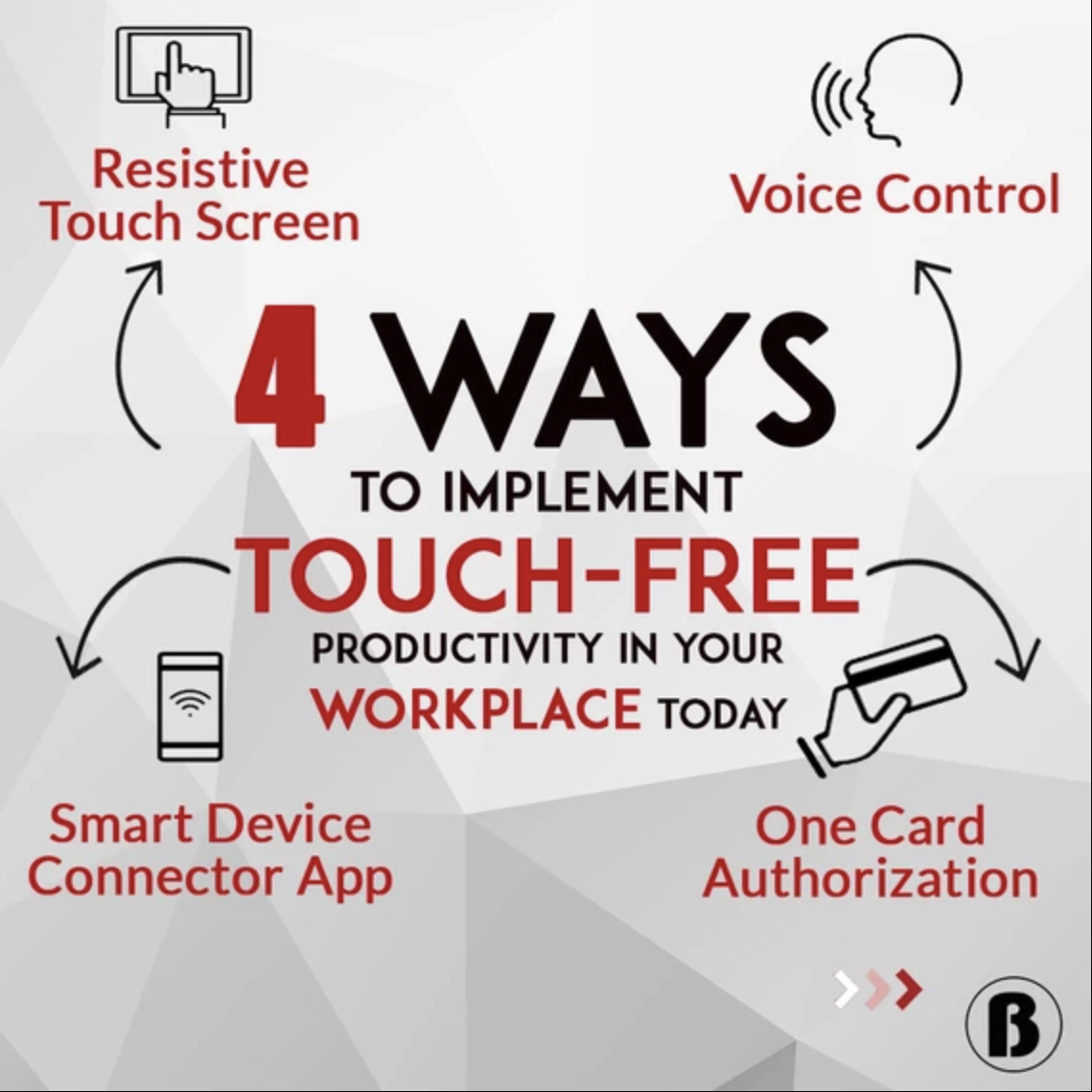
Four Real Ways Miami Offices Go Touch-Free
Here is what actually happens on the floor. Each of these is live at Barlop customers today, not a pitch deck promise.
1. Resistive Touch Screens for Gloved or Assisted Use
Ricoh Intelligent MFPs and many Sharp and Canon models ship with resistive operation panels. They respond to pressure from a gloved hand, a stylus, or even a pen cap. Healthcare offices in Miami love this because staff wear gloves all day. Legal offices use it when carrying files or coffee. Either way, the panel works when hands are not free.
2. Smart Device Connector and Mobile Release
The Ricoh Smart Device Connector app, MyQ Roger, PaperCut Mobility, and similar platforms let users operate an MFP from their phone. Print, scan, release, and upload to cloud storage, all from the device in their pocket. No physical contact with the panel. And every job is tied to a verified user, so nothing prints and sits unclaimed.
3. Badge and Card Authentication
One card, many doors. The HID, HID iClass, or Mifare badge used to open the office suite also releases print jobs at any networked Barlop MFP. Swipe to authenticate. Your queue shows up. Release what you want, and walk away with nothing left behind. For regulated industries like healthcare, finance, and legal, this is a simple path to tighter chain of custody on printed records.
4. Intelligent Voice Control
Ricoh, Sharp, and Xerox have all brought voice assistants to their MFP lines. Say “copy two sided, five copies, staple” and the device responds. Say “scan to HR” and it routes the document through a pre-approved workflow. For staff with mobility challenges or staff juggling documents, voice removes friction.
Smart Office Technology Comparison: Touch-Free Options at a Glance
Not every office needs every feature. Here is how the main touch-free options compare so you can pick the mix fitting your budget and your risk profile.
| Feature | Best For | Typical Setup Time | Security Impact |
|---|---|---|---|
| Mobile Print Release | Hybrid teams, open floor plans | 1 to 2 days | High, removes tray loitering |
| Badge Authentication | Regulated industries, secure buildings | 2 to 5 days | High, audit trail per user |
| Voice Control | Healthcare, accessible workstations | Same day | Medium, pairs well with badge |
| Facial Recognition at Entry | Server rooms, executive suites | 1 to 2 weeks | High, contact free access |
| Occupancy Sensors | Lighting, HVAC, meeting rooms | 1 week | Low direct, high operational savings |
| QR Scan to Device | Guest users, short term visitors | Same day | Medium, time-limited access |
How Barlop Business Systems Helps Miami Go Touch-Free
We are an office technology partner, not just a copier vendor. Our Miami team will walk your space, map every shared device, and build a plan matching how your people actually work. The plan might mean a full refresh to intelligent MFPs. Or it might mean layering mobile release and badge auth on top of equipment you already own.
Mobile Print Rollout
We deploy and train your team on Ricoh Smart Device Connector, MyQ, and PaperCut Mobility.
Badge Integration
HID, iClass, and Mifare card support tied to your existing building access system.
Voice and AI Workflows
Enable Alexa for Business, Intelligent Voice Control, and voice-driven scan routing.
Print Security Hardening
Firmware patching, admin account cleanup, and encrypted scan-to-email configuration.
Managed IT Bundle
Add endpoint, network, and email protection from our Miami-based support team.
On-Site Service
Local technicians across Miami-Dade and Broward, with response times most vendors cannot match.
Productivity Gains You Can Measure
Touch-free is nice. Faster is better. Here is where the real return shows up on a spreadsheet. Mobile release eliminates the cycle of “print, walk, wait, re-print” hybrid teams know too well. Badge auth kills the mystery job still sitting in the tray at 5 p.m. Voice commands shave seconds off repeat tasks, adding up to real hours over a month.
Our customers report shorter queues at shared devices, lower toner waste from abandoned jobs, and cleaner audit logs when compliance season rolls around. And because jobs now attach to a user, IT can see who prints what, route high-volume users to the right device, and budget toner spend with real data.
Productivity Wins We Typically See
- 20 to 30% reduction in wasted print volume within the first 90 days of mobile release.
- Faster scan-to-cloud routing thanks to AI-driven file naming and folder detection.
- Less shadow IT because staff stop emailing scans to personal accounts when the MFP handles it cleanly.
- Better device utilization. High-end color MFPs get used for the right jobs, not for quick internal memos.
What Ricoh, Sharp, Canon, and Kyocera Are Shipping in 2026
The OEMs did not stop innovating after the pandemic. If anything, they doubled down. Ricoh’s IM C series ships with Always Current Technology, so new features like smarter voice routing arrive as firmware updates. Sharp’s Synappx platform pairs MFPs with Alexa, Google Assistant, and Microsoft Teams Rooms. Canon’s imageRUNNER ADVANCE DX line leans into uniFLOW Online for cloud print and badge release. Kyocera’s HyPAS platform hosts custom apps built for specific industries like healthcare and legal.
Which one is right for your Doral, Coral Gables, or Brickell office? The answer depends on the software you already run, the budget you have, and how many users share each device. It is the conversation our sales engineers have every week, and it is why Barlop customers rarely end up with a device too big, too small, or too complicated for their team.
Want a primer on how copier leasing fits into this? Check out our guide on copier and printer leasing in Miami. For broader IT planning, our overview of managed IT services walks through how print, network, and endpoint security come together.
Common Concerns, Answered Honestly
We get three questions every single week. One: is voice control actually useful or is it a gimmick? Two: what if my staff hates the mobile app? Three: will touch-free slow me down when I am in a hurry?
Our honest answer to all three is “it depends on deployment.” Voice is a productivity win for repeat tasks and accessibility scenarios. For rare tasks it is a novelty. The mobile app works when IT rolls it out with training and when the default workflows match how people already print. And no, touch-free does not slow you down when it is set up correctly, because badge tap is faster than navigating a menu from scratch.
We will tell you when a feature is overkill for your team. We will also tell you when your current print fleet is holding you back. It is what 40 years in the Miami market has taught us to do.
Compliance, HIPAA, and Touch-Free Workflows
South Florida has a dense base of medical practices, law firms, and financial services. All three sectors face tight rules on document handling. Touch-free workflows help on three specific compliance fronts. Audit trails capture user activity at the device. Secure release prevents documents from sitting unattended. Encrypted scan paths protect data in motion.
The HHS HIPAA Security Rule guidance is explicit about access control and audit logs. Touch-free MFP workflows check both boxes. Ask us how your current setup maps to those controls, and we will walk you through the gaps in plain language.
Average cost of a print-related breach in 2025
Integrating Touch-Free Tech With Your Existing IT Stack
A smart MFP does not live alone. It connects to Active Directory, Azure AD, or Google Workspace for user identity. The device also talks to your file shares for scan routing. Handoffs continue to cloud drives like SharePoint, OneDrive, Dropbox, Google Drive, or Box. And it reports back to your security tools for audit and monitoring.
Our integration checklist covers identity, storage, and security. On identity, we map user accounts between your directory and the print management platform so people log in with the same credentials they already know. For storage, we build scan workflows pointing to the right folder structure, with auto-naming driven by OCR. On security, we feed device logs into your SIEM or managed detection platform if you have one, and we apply vendor hardening guides from Ricoh, Sharp, Canon, and Kyocera to lock down every unused port and service.
Smaller offices without a dedicated IT team get a simplified version of the same work. We handle identity via a local admin account, route scans to a shared drive, and monitor the devices from our Barlop service desk. Either way, the goal is a print environment matching the rest of your IT, not fighting it.
Sustainability Wins Nobody Advertises
Touch-free workflows also save paper. A lot of paper. Mobile release alone kills abandoned print jobs, which industry analysts estimate at 10 to 20% of total print volume in most offices. Multiply by a pack of paper a week per department, and the savings become visible inside a quarter. Less paper, less toner, fewer supply deliveries, smaller carbon footprint. For Miami offices chasing LEED credits or ESG reporting, the numbers flow straight into the sustainability report.
Ricoh, Sharp, and Canon all publish Energy Star certifications on current MFP lines. Pair those devices with mobile release, and your fleet runs leaner across the board. We can pull device usage reports on a monthly cadence so you see how the fleet is trending and where to tune settings further.
Cost, Leasing, and What a Pilot Looks Like
You do not have to boil the ocean. A typical Barlop rollout starts with a pilot on one floor or one department. We pick two or three shared devices, enable mobile release and badge auth, and train a small group. Once the team is comfortable, we roll out to the rest of the office in waves. Most pilots go live within two weeks.
On cost, touch-free software licenses run anywhere from a few dollars per user per month to bundled costs inside your copier lease. Many of our customers roll the software into their lease so the monthly number stays predictable. If you want a ballpark, our copier leasing team can quote a pilot and a full rollout in the same conversation.
Frequently Asked Questions
What is touch-free office technology?
It is any hardware or software letting people operate shared office devices without touching a keypad or screen. Examples include mobile print release, badge authentication, voice control, facial recognition, and sensor-driven workflows for lights, locks, and HVAC.
Is touch-free technology still relevant after the pandemic?
Yes, and arguably more than ever. The benefits turned out to be productivity and security, not just hygiene. Mobile release cuts wasted prints. Badge auth tightens compliance. Voice helps accessibility. The hygiene piece was the spark, but the other benefits kept the technology on the roadmap.
Can my existing copier support mobile print release?
Many modern Ricoh, Sharp, Canon, Kyocera, and Xerox MFPs support some form of mobile release through a free or paid app. Older devices may need a firmware update or a third-party server like PaperCut. Barlop can audit your fleet and tell you in a day what can be enabled and what needs a refresh.
How much does badge authentication cost to add?
Hardware readers typically run between $150 and $400 per device. Software licensing runs a few dollars per user per month, or flat per device. If you already use HID or Mifare for door access, reusing those cards saves on new credentials. Barlop will quote the whole setup, including training.
Does voice control really work in a noisy office?
It works better than most people expect. Modern MFPs use directional microphones and wake words like “Hey Ricoh” or “Alexa.” Background noise rarely triggers false commands. Still, we always recommend a short hands-on demo before a large rollout so your team can judge for themselves.
How does touch-free technology improve security?
Three ways. It authenticates users before any job releases, so nothing sits in the tray. It captures an audit trail of every action at the device. And it encrypts scan-to-email paths so documents cannot be intercepted. Those controls align with NIST and CISA guidance for small and midsize businesses.
Is touch-free technology HIPAA compliant?
The technology itself is a building block, not a compliance certification. Deployed correctly, it satisfies several HIPAA Security Rule requirements including access control and audit logging. Barlop configures every healthcare customer with HIPAA-aligned settings and documents the setup for your compliance binder.
What happens if the mobile app goes down?
Good design means you always have a fallback. Badge auth still works at the panel. Manual login still works with a user PIN. We configure every fleet with multiple release paths so a single app outage does not grind your office to a halt.
How long does a touch-free rollout take?
A single department pilot typically goes live within two weeks. A full office rollout, including training, runs four to eight weeks depending on fleet size. We move in waves so staff are never forced to learn everything at once.
Can Barlop manage the whole project?
Yes. It is exactly what we do. Barlop Business Systems handles device selection, installation, software configuration, user training, ongoing patching, and day-to-day service. Your IT team focuses on their core systems while we keep the print and scan fleet running.
Do you support offices outside Miami?
Yes. We cover Miami-Dade, Broward, and Palm Beach counties, with service techs stationed across South Florida. Many of our multi-site customers have locations from Doral to Fort Lauderdale and rely on one Barlop contract for the whole footprint.
How do I get started?
Call our Miami team at (786) 833-7781 or request a no-pressure fleet assessment. We will walk your space, review your current devices, and lay out a plan with costs and timelines. No hard sell, no commitment on the first visit.
Ready to Go Touch-Free?
Miami’s Trusted Office Equipment & Managed IT Partner for Over 40 Years. Barlop Business Systems will audit your fleet, recommend the right intelligent MFPs, and handle the rollout end to end.
Call (786) 833-7781 or click below to browse our current equipment lineup.