AI Overview:
Network Configuration Management (NCM) is your network’s built-in safety system — tracking, controlling, and backing up every router, switch, and firewall configuration so nothing slips through the cracks. The blog explains how automated NCM tools prevent the #1 cause of major outages — misconfigurations — while improving security, compliance, and recovery speed.
In simple terms: NCM keeps your network organized, secure, and easy to fix when things go wrong. It works hand-in-hand with monitoring tools, ensuring devices are set up correctly before performance issues even occur.
In a world of hybrid clouds, IoT, and nonstop updates, automation is no longer optional. Modern NCM platforms help businesses eliminate human error, reduce downtime, and maintain “golden” configurations across all systems. The takeaway: with smart configuration management, your network stops being a headache and becomes a competitive advantage.
Network Configuration Management: #1 Essential Guide
Why Network Configuration Management is Your Network’s Best Friend
Network configuration management is the practice of systematically tracking, controlling, and maintaining the settings and configurations of all devices in your network infrastructure. It’s like having a detailed blueprint and maintenance record for every router, switch, firewall, and server in your organization.
Quick Answer for Network Configuration Management:
- What it is: Automated tools that backup, monitor, and manage device settings across your network
- Why it matters: Prevents costly outages (45% are caused by configuration failures) and security breaches
- Key benefits: Faster incident recovery, automated compliance, reduced human error, and improved security
- Best for: Any business with more than a few network devices that can’t afford downtime
Think about it this way: without proper configuration management, your network is like a library where books constantly get moved around, but no one updates the catalog. When you need to find something quickly (or fix a problem), you’re stuck searching through chaos.
The numbers tell the story. Research shows that 92% of network professionals say there are more network updates needed than they can keep up with. Meanwhile, configuration management failures cause 45% of major network outages, with over two-thirds costing more than $100,000.
But here’s the good news: modern networks don’t have to be this complicated. With the right approach, you can transform your network from a constant source of stress into a well-oiled machine that practically runs itself.
In today’s world of hybrid clouds, remote work, and increasing cyber threats, having a solid handle on your network configurations isn’t just nice to have – it’s absolutely essential for business survival.
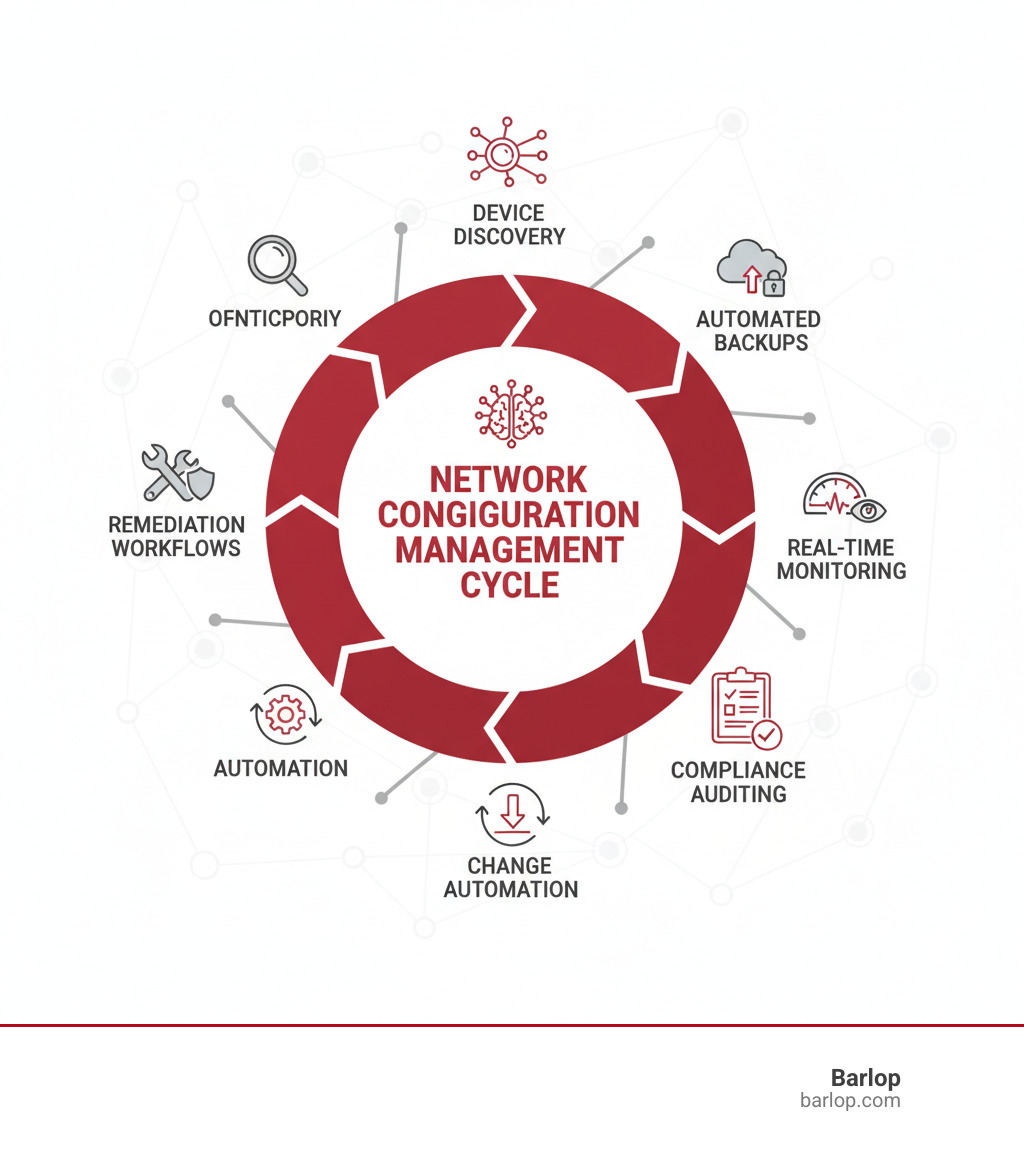
Key terms for network configuration management:
What is Network Configuration Management (NCM)?
Think of network configuration management (NCM) as your network’s personal assistant—one that never sleeps, never forgets, and always knows exactly where everything is supposed to be. At its core, NCM is the systematic practice of tracking, controlling, and maintaining every setting on every device across your network infrastructure.
But let’s break that down into human terms. Your network is made up of dozens, maybe hundreds of devices—routers, switches, firewalls, servers—each with its own complex set of configurations. Without proper management, keeping track of all these settings is like trying to remember every book in a library that’s constantly being reorganized by different people who don’t talk to each other.
Network configuration management creates order from this chaos. It automatically backs up device settings, tracks changes, and ensures everything stays consistent with your organization’s policies and regulatory requirements. Gone are the days of frantically typing commands into a command-line interface at 2 AM, hoping you remember the right syntax while your entire network is down.
The beauty of modern NCM lies in its evolution from those manual, error-prone processes to automated systems that provide a single source of truth for all your network configurations. It’s like having a master blueprint that’s always up-to-date, always accurate, and always ready when you need it most.
For a deeper understanding of how NCM fits into your overall network strategy, check out A Comprehensive Guide to Effective Network Management. You can also explore more about the fundamental concepts at What is Network Configuration Management?
The Core Purpose: Your Network’s Master Blueprint
Here’s where network configuration management really shines: systematic tracking of every IT asset, its current status, and how it relates to everything else in your network. It’s comprehensive lifecycle management that follows devices from the moment they join your network until they’re eventually retired.
Picture this scenario: It’s Tuesday morning, and a critical firewall suddenly fails. Without NCM, your team would spend hours—maybe even days—rebuilding its configuration from scratch, piecing together settings from memory, documentation (if it exists), and guesswork. Your business operations grind to a halt, and every minute costs money.
With proper NCM in place, that same scenario plays out very differently. The system immediately identifies the failure, and within minutes, your team can restore the exact configuration from a verified backup. What could have been a disaster becomes a minor hiccup.
This proactive approach focuses on reducing downtime, identifying erroneous changes before they cause problems, and ensuring consistent operation across your entire infrastructure. It’s about performance optimization through prevention rather than cure—turning your IT team from firefighters into architects.
NCM vs. Network Monitoring: What’s the Difference?
Many people confuse network configuration management with network monitoring, but they’re actually complementary partners with very different jobs. Think of your network like a car: NCM makes sure all the parts are installed correctly and tuned properly, while monitoring checks whether the car is actually running well.
| Feature | Network Configuration Management (NCM) | Network Monitoring |
|---|---|---|
| Primary Focus | The state and settings of network devices. | The performance and availability of network devices and services. |
| Key Question | “Is this device configured correctly?” “Has anything changed?” | “Is this device up?” “How much traffic is it handling?” “Is it slow?” |
| Approach | Proactive: Defines, enforces, and backs up desired configurations. | Reactive/Proactive: Alerts when performance deviates or failures occur. |
| Activities | Backup, restore, change management, compliance, auditing, automation. | Uptime checks, traffic analysis, latency, packet loss, resource usage. |
| Goal | Ensure consistency, security, and the ability to recover quickly. | Identify performance issues, outages, and bottlenecks. |
NCM is inherently proactive—it sets the foundation for stability by ensuring devices are configured according to your “golden standard.” Network monitoring, on the other hand, is more reactive, alerting you when performance issues arise or devices go offline.
The magic happens when these two work together. NCM ensures your network is built on solid ground, while monitoring keeps watch over how well everything performs on that foundation. One focuses on the “what” and “how” of device settings, the other on “how well” those devices are actually performing in the real world.
Why NCM is Crucial in Today’s Hybrid World
Remember when networks were simple? When everything lived in one building, behind one firewall, managed by one team? Those days are long gone. Today’s networks are sprawling, complex ecosystems that span physical data centers, private clouds, and multiple public cloud providers all at once.
This isn’t just about having more devices to manage (though there are certainly more of those). It’s about dealing with fundamentally different types of infrastructure that all need to work together seamlessly. Your employees might be connecting from home offices, coffee shops, and client sites. Your applications might be running partly on Amazon Web Services, partly in your own server room, and partly on Microsoft Azure.
Add to this mix the explosion of IoT devices – everything from smart thermostats to industrial sensors – and you’ve got a network that’s more like a living organism than the predictable, contained systems of the past. Each of these elements needs to be configured correctly, secured properly, and maintained consistently.
The challenge becomes even more daunting when you consider that 73% of enterprises have experienced security and compliance issues simply because their network teams and cloud teams don’t communicate effectively. When your infrastructure spans multiple domains and involves multiple teams, maintaining consistent network configuration management becomes both more critical and more difficult.
For organizations struggling with this complexity, understanding network security fundamentals becomes essential. The Uptime Institute’s 2023 Annual Outage Analysis shows just how costly these configuration failures can be in our increasingly connected world.
The High Cost of Doing Nothing
Here’s a sobering reality check: configuration management failure causes 45% of all major network outages. That means nearly half of the times your network goes down, it’s because someone made a mistake with a device setting, or because an important configuration change wasn’t properly managed.
But it gets worse. These aren’t just minor hiccups that inconvenience a few users for a few minutes. More than two-thirds of all major outages now cost organizations over $100,000. For many businesses, that’s a devastating financial hit that can impact everything from quarterly earnings to annual bonuses.
The ripple effects extend far beyond the immediate downtime costs. When your network isn’t properly configured, you’re essentially leaving the door open for security vulnerabilities. Cybercriminals actively scan for misconfigured devices because they know these are often the easiest way into a network. A single misconfigured firewall rule or an unpatched device can become the entry point for a breach that costs millions.
Compliance penalties are another hidden cost of poor configuration management. Industries like healthcare (HIPAA), finance (PCI DSS), and others have strict requirements about how network devices must be configured. When auditors find inconsistencies or violations, the fines can be substantial – and the reputational damage even more costly.
Perhaps most frustrating is the operational inefficiency that comes with manual configuration management. Your talented IT staff ends up spending their time on repetitive, error-prone tasks instead of working on projects that actually move your business forward. Every hour spent manually updating firewall rules or troubleshooting a misconfigured router is an hour not spent on innovation.
Human error remains the biggest wild card in all of this. Even the most experienced network engineers make mistakes, especially when they’re working under pressure to restore service during an outage. Without proper configuration management tools and processes, these mistakes are inevitable.
How NCM Boosts Security and Ensures Compliance
Think of network configuration management as your organization’s immune system. Just as your body constantly monitors for threats and maintains healthy function, NCM continuously watches your network configurations, ensuring they stay secure and compliant.
Automated audits are perhaps the most powerful security feature of modern NCM solutions. Instead of waiting for annual compliance reviews or hoping someone notices a misconfiguration, these systems continuously check every device against established security policies. Whether you need to comply with HIPAA for healthcare data, PCI DSS for payment processing, or SOX for financial reporting, NCM tools can automatically verify that your configurations meet these requirements 24/7.
The concept of policy enforcement through “golden configurations” is for security. Instead of hoping each network engineer remembers all the security requirements, you define the perfect, secure configuration once, and the NCM system ensures every device matches this template. Any deviation gets flagged immediately, whether it’s caused by human error, a software bug, or potentially malicious activity.
Detecting unauthorized changes is where NCM really shines from a security perspective. Every modification to every device gets logged with details about who made the change, when they made it, and exactly what changed. This creates an audit trail that’s invaluable for both security investigations and compliance reporting.
The results speak for themselves: 97% of customers report improved security posture after implementing proper configuration management. This isn’t just about checking compliance boxes – it’s about fundamentally strengthening your organization’s defenses against cyber threats.
For organizations looking to take their security to the next level, exploring managed security services can provide the expertise and 24/7 monitoring that internal teams often can’t match.
Key Features and Benefits of a Modern NCM Solution
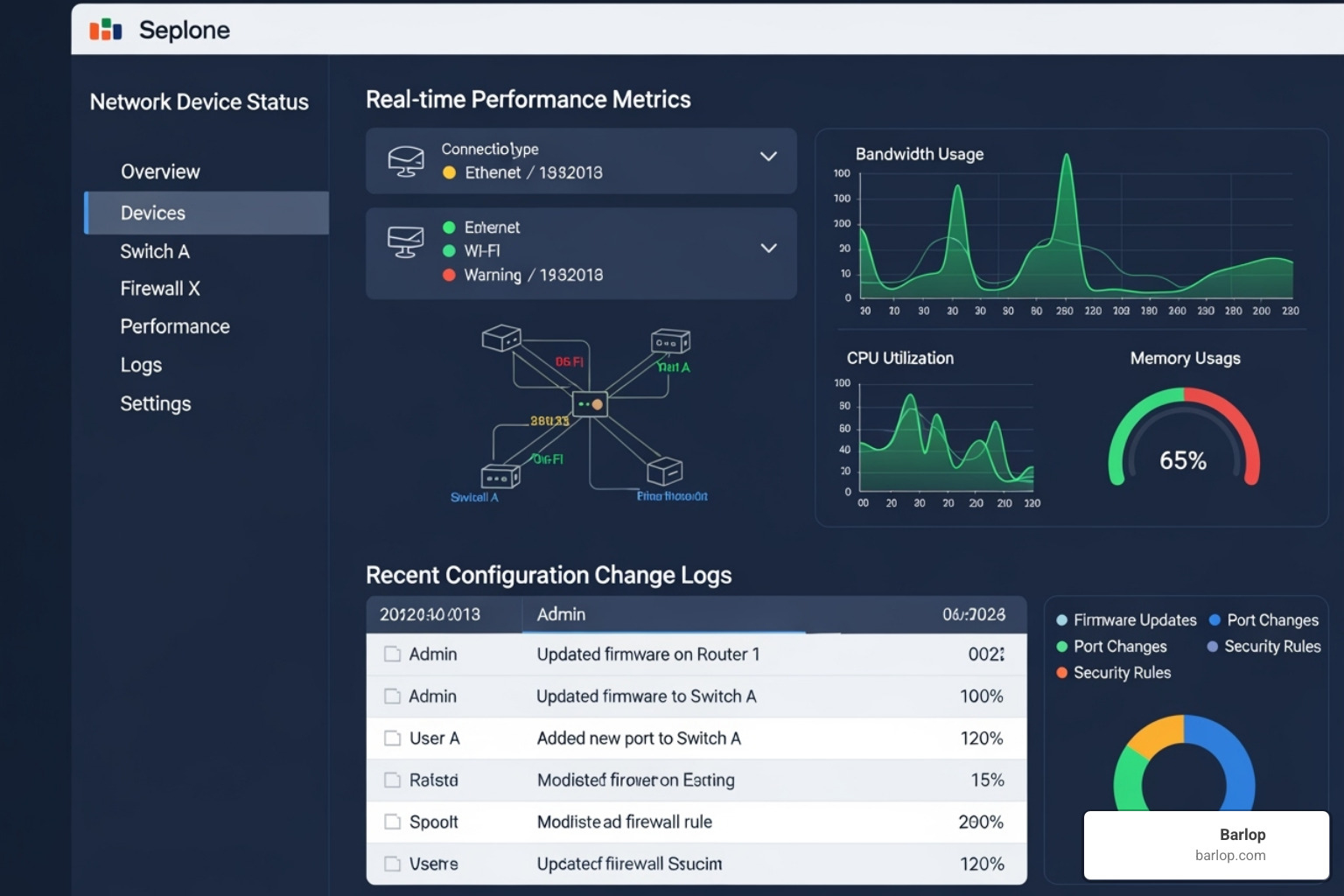
Think of a modern network configuration management solution as your network’s personal assistant—one that never sleeps, never forgets, and never makes careless mistakes. It’s far more sophisticated than the basic backup tools of yesteryear. Today’s NCM platforms are comprehensive command centers that transform chaotic network operations into well-orchestrated symphonies.
The change is remarkable. When network issues strike (and they will), a robust NCM solution can reduce your Mean Time to Resolution (MTTR) from hours to minutes. Instead of frantically troubleshooting in the dark, your team can quickly identify what changed, when it changed, and roll back to a working configuration with just a few clicks.
But the benefits extend far beyond crisis management. Operational efficiency skyrockets when your team stops fighting fires and starts focusing on strategic initiatives. Network engineers can finally move beyond the endless cycle of manual updates and reactive troubleshooting to work on projects that actually move the business forward.
As your organization grows, scalability becomes crucial. A modern NCM solution ensures that adding new devices, locations, or even entire cloud environments doesn’t exponentially increase your management complexity. It’s like having a management system that grows seamlessly with your ambitions.
Perhaps most importantly, NCM future-proofs your network investments. Whether you’re preparing for 5G deployments, IoT expansions, or the next wave of cloud technologies, a solid configuration management foundation ensures you’re ready to adapt without starting from scratch. This strategic advantage is why many forward-thinking organizations turn to The Benefits of Managed Network Services to maximize their NCM investments.
[LIST] of Must-Have NCM Features
When evaluating network configuration management solutions, certain capabilities separate the game-changers from the also-rans. Here’s what truly matters:
- Automated Device Findy and Mapping creates your network’s digital twin, automatically finding every device and mapping their relationships. No more outdated spreadsheets or surprise findies during outages.
- Configuration Backup and Restore serves as your network’s time machine, creating validated snapshots and enabling one-click recovery to any previous working state.
- Real-time Change Management acts like a security camera for your configurations, tracking every modification with forensic detail about who, what, when, and why.
- Continuous Compliance Auditing functions as your always-on compliance officer, automatically checking configurations against industry standards and flagging deviations before they become problems.
- Automation and Scripting Engine transforms repetitive tasks into reliable, repeatable processes that eliminate human error and free up your team for higher-value work.
- Multi-Vendor Support prevents vendor lock-in nightmares by managing diverse device ecosystems through a single, unified interface.
- Role-Based Access Control (RBAC) ensures the right people have the right access at the right time, maintaining security without hindering productivity.
- Detailed Reporting and Alerts provides the visibility and proactive notifications you need to stay ahead of issues before they impact operations.
How Automation Transforms Network Configuration Management
Here’s a sobering reality: 92% of network operations and security professionals say there are more network updates needed than they can keep up with manually. If this sounds familiar, you’re not alone—and you’re definitely not crazy for feeling overwhelmed.
Automation doesn’t just help with this challenge; it completely transforms how we approach network configuration management. Instead of drowning in repetitive tasks, your team can focus on the work that actually requires human creativity and expertise.
The impact is often dramatic. Consider this real-world example: updating firewall licenses on Palo Alto devices typically requires about 10 hours of painstaking manual work. With proper automation, that same task shrinks to just 30 minutes—including the time to create the automation workflow. Multiply that efficiency gain across hundreds or thousands of devices, and you’re talking about changeal productivity improvements.
Golden configurations become achievable through automation. Instead of hoping every device is configured correctly, automation enforces standardized, error-free baselines across your entire infrastructure. Configuration drift becomes a thing of the past because the system continuously ensures every device matches your approved templates.
Perhaps most importantly, automation scales your team’s capabilities without requiring proportional headcount increases. A small, skilled team can manage vastly larger and more complex networks when automation handles the routine work. This isn’t about replacing people—it’s about amplifying their impact and job satisfaction by eliminating the mundane tasks that nobody enjoys anyway.
Modern automation platforms often include no-code and low-code options, which means even junior administrators can safely perform complex operations with proper guardrails in place. This democratization of advanced capabilities helps organizations build more resilient teams while providing professional growth opportunities for their staff.
For organizations looking to understand how automation fits into the broader infrastructure picture, Infrastructure Automation & Operations at Scale offers valuable insights into scaling these practices across enterprise environments.
Best Practices for Effective Network Configuration Management
Building an effective network configuration management strategy isn’t just about buying the right tools—it’s about creating a comprehensive approach that brings together your people, processes, and technology into a cohesive system. Think of it like building a house: you need a solid foundation, quality materials, and skilled craftsmanship working together.
The reality is that many organizations jump straight to implementing fancy NCM tools without establishing the underlying practices that make them truly effective. This often leads to expensive software that sits underused while network teams continue struggling with the same old problems.
At Barlop, we’ve seen how the right combination of smart strategies and proven practices can transform chaotic network operations into smooth, predictable systems. For deeper insights into optimizing your overall IT operations, explore our IT support best practices. You’ll also find valuable guidance in this external resource on Network Configuration and Change Management: Seven Best Practices.
Establish a Centralized, Version-Controlled Repository
The heart of any successful network configuration management strategy is creating a single, authoritative source of truth for all your network configurations. Think of this centralized repository as your network’s “master library”—a place where every configuration file, historical change, and approved template lives in perfect harmony.
Without this central hub, your network team ends up like archaeologists, digging through scattered files, outdated documentation, and individual workstations trying to piece together the current state of your infrastructure. We’ve all been there: a critical device fails at 2 AM, and nobody can find the current configuration backup. It’s a nightmare scenario that a proper repository prevents entirely.
Your centralized repository becomes invaluable because it ensures every network engineer works from the same verified configurations, eliminating the dangerous guesswork that leads to outages. Every change gets logged with detailed information about who made it, what was modified, and exactly when it happened. This creates an audit trail that’s not just helpful for troubleshooting—it’s often required for compliance with industry regulations.
Perhaps most importantly, this repository acts as your defense against configuration drift—those sneaky, unauthorized changes that creep into devices over time. By continuously comparing live device settings against your “golden standard” configurations, you can quickly spot and fix problems before they cause major issues.
Integration with a Configuration Management Database (CMDB) takes this concept even further, giving you a complete picture of how all your IT assets connect and depend on each other. It’s like having a detailed map of your entire technology ecosystem.
Automate Backups, Restores, and Software Updates
Manual backups are like promising yourself you’ll exercise “tomorrow”—they seem like a good idea until real life gets in the way. The harsh truth is that manual processes in network configuration management don’t just slow you down; they create dangerous gaps in your safety net.
Automated, scheduled backups should run like clockwork, capturing configuration snapshots from every device on your network without human intervention. But here’s the crucial part that many organizations miss: these backups must be validated. Having a backup file that looks complete but can’t actually restore your device is worse than having no backup at all—it gives you false confidence.
When disaster strikes—and it will—automated backups become your lifeline. We can quickly provision a replacement device and push the last-known good configuration, turning what could be hours of downtime into minutes of minor inconvenience. The difference between a career-defining crisis and a minor hiccup often comes down to having reliable, tested backups ready to deploy.
Software updates and patch management represent another area where automation shines. The statistics are sobering: software vulnerabilities are critical for network safety, yet manual update processes are so time-consuming that they often get postponed until it’s too late.
Modern NCM solutions handle complex, multi-step updates across different device types, ensuring high-availability pairs stay synchronized and security patches get deployed consistently across your entire infrastructure. This isn’t just about convenience—it’s about maintaining a security posture that actually protects your business.
Implement and Enforce Change Management Policies
Even the most sophisticated automation needs guardrails. Network configuration management without proper change management policies is like having a race car without brakes—impressive speed, but lacking the control needed to avoid crashes.
Structured approval workflows ensure that every proposed change gets proper scrutiny before deployment. This doesn’t mean creating bureaucratic bottlenecks that slow everything down. Instead, it means establishing clear, efficient processes where stakeholders can quickly review and approve changes based on their potential impact and risk level.
Pre-deployment testing should be non-negotiable for any significant configuration change. Testing changes in a staging environment—whether that’s a dedicated lab or a virtualized replica of your production network—helps identify problems when they’re easy to fix, not when they’re causing outages for your entire organization.
The audit trail created by proper change management becomes incredibly valuable over time. When issues arise weeks or months later, having detailed logs of who changed what and when can mean the difference between quick resolution and extended troubleshooting sessions.
Breaking down team silos might be the most important aspect of effective change management. Research shows that 73% of enterprises experience security and compliance issues due to poor collaboration between network and cloud teams. By implementing shared platforms, regular alignment meetings, and integrated ticketing systems, we can eliminate the miscommunication and duplicated efforts that plague many IT organizations.
The goal isn’t to slow down your network operations—it’s to make them more predictable, reliable, and ultimately faster by eliminating the chaos that comes from uncontrolled changes.
Frequently Asked Questions about NCM
When businesses start exploring network configuration management, certain questions come up time and again. These are the real-world concerns that keep IT managers up at night and the practical questions that determine whether an NCM implementation will succeed or fail. Let’s address the most common ones with straightforward, actionable answers.
What is the first step in network configuration management?
The journey into network configuration management always begins with automated device findy and inventory. Think of it like trying to organize a messy garage - you can't put everything in its proper place until you know what you actually have.
An NCM tool performs a comprehensive scan across your network, methodically identifying every active device it can find. This includes routers, switches, firewalls, load balancers, and even those forgotten devices tucked away in remote closets that nobody talks about anymore. The tool gathers essential information like device types, IP addresses, firmware versions, and current configurations.
This automated findy creates your network's "master inventory" - a complete, up-to-date catalog that serves as the foundation for everything else. Without this accurate starting point, trying to manage configurations becomes like playing a guessing game blindfolded. You simply can't backup, monitor, or secure devices you don't know exist.
How does NCM help reduce network downtime?
Network configuration management tackles downtime from multiple angles, and the results can be dramatic. The most important thing to understand is that misconfigurations cause 45% of major network outages - nearly half of all serious problems could be prevented with proper NCM. Here's how NCM keeps your network running smoothly. First, it prevents problems before they happen by enforcing "golden configurations" - proven, stable settings that work reliably. When devices drift away from these standards, NCM catches it immediately and can automatically fix the problem. But when things do go wrong (and they will), NCM becomes your network's time machine. Instead of spending hours trying to figure out what changed and manually rebuilding configurations, you can quickly identify the problematic modification and roll back to a last-known good configuration with just a few clicks. This capability slashes your Mean Time to Resolution (MTTR) from hours or days down to minutes. The peace of mind this brings is invaluable. Instead of frantically troubleshooting at 2 AM, you're restoring service quickly and getting back to sleep.
Can NCM manage devices from different vendors?
Absolutely, and this is one of the most critical capabilities of modern network configuration management solutions. The days of single-vendor networks are long gone - today's infrastructure typically includes equipment from multiple manufacturers like Cisco, Juniper, Palo Alto, Fortinet, and dozens of others.
A robust NCM platform is specifically designed to handle this multi-vendor reality. It communicates with different devices using various protocols (SSH, Telnet, SNMP, APIs) and understands the unique command structures and configuration formats of each vendor. This means you can manage your entire heterogeneous network from one unified dashboard.
The real magic happens when you realize you can apply consistent policies and procedures across all your equipment, regardless of who made it. Security standards, backup schedules, compliance checks, and change management workflows work the same way whether you're dealing with a Cisco router or a Juniper firewall. This unified approach eliminates the complexity and confusion that comes from managing different vendor tools separately, giving you complete visibility and control over your entire network infrastructure.
Conclusion: Take Control of Your Network’s Future
Throughout this guide, we’ve journeyed through the essential world of network configuration management, uncovering how it’s transformed from simple device backups into a comprehensive strategy for network resilience. We’ve seen the sobering reality that 45% of major outages stem from configuration failures, costing businesses over $100,000 each time. But we’ve also finded the incredible potential that lies ahead.
The change from reactive firefighting to proactive network management isn’t just a nice-to-have anymore—it’s absolutely critical for business survival. When 92% of network professionals say they can’t keep up with the volume of updates needed, it’s clear that manual approaches have reached their breaking point.
Modern network configuration management offers a way forward that’s both practical and powerful. Through automated device findy, validated backups, real-time change tracking, and continuous compliance monitoring, businesses can finally get ahead of their network challenges instead of constantly playing catch-up.
The future belongs to organizations that accept automation strategically. We’re not talking about replacing human expertise—we’re talking about amplifying it. When routine tasks are automated, your skilled network engineers can focus on innovation, strategic planning, and solving the complex challenges that truly require human insight.
Think about what this means for your business. Instead of spending weekends recovering from outages, your team could be planning network improvements. Instead of scrambling to meet compliance deadlines, you could have continuous, automated auditing that keeps you always ready. Instead of fearing network changes, you could deploy updates confidently, knowing you can roll back instantly if needed.
At Barlop, we’ve seen how the right network configuration management strategy transforms not just networks, but entire organizations. When your infrastructure becomes predictable and manageable, everything else becomes possible. Your team feels empowered instead of overwhelmed. Your business operations become more reliable. Your future becomes more secure.
The question isn’t whether you need better network management—it’s how quickly you can implement it. Every day without proper NCM is another day of unnecessary risk, inefficiency, and stress for your team.
Ready to transform your network from a source of constant worry into a competitive advantage? We’re here to help you make that journey. Learn more about our Managed Network Services and find how we can partner with you to build the resilient, automated network your business deserves.